
 TRAE-AI编程



OpenAI 使用嵌入构建网页问答系统
开始之前
本教程以 OpenAI 网站为例,采集网页文本,用嵌入向量 API 将文本转换成向量,再构建一个基于检索内容的问答系统。你可以把它作为搭建自有知识库应用的起点。
建议具备基础的 Python 和 GitHub 知识。先设置 API 密钥,再完成快速开始,熟悉 API 的基本调用方式。
使用 Python 3.11 或更高版本。创建虚拟环境,安装示例依赖,再按照快速开始设置 OPENAI_API_KEY。
## [中文] 创建虚拟环境并安装依赖。
python -m venv env
source env/bin/activate
python -m pip install openai pandas numpy requests beautifulsoup4 tiktoken matplotlib
按顺序把示例放入 Python 文件或笔记本,并在同一工作目录运行。
设置网页爬虫
选择你有权抓取的网站,按以下步骤收集用于生成嵌入向量的文本。
构建网页爬虫
生成嵌入向量前,需要先获得文本。这里以 OpenAI 网站为例,你也可以将同样的方法用于自己的公司或个人网站。
本例从头实现爬虫。你也可以使用 Scrapy 等开源工具。
爬虫从代码末尾指定的根网址开始,访问页面并跟踪同一域名下的新链接。先导入依赖,设置起始网址,再定义一个 HTMLParser 子类。
## [中文] 定义链接解析器并设置起始域名。
import requests
import re
import urllib.request
from bs4 import BeautifulSoup
from collections import deque
from html.parser import HTMLParser
from urllib.parse import urldefrag, urljoin, urlparse
import os

## Regex pattern to match a URL
HTTP_URL_PATTERN = r"^http[s]*://.+"

domain = "openai.com"  # <- put your domain to be crawled
full_url = "https://openai.com/"  # <- put your domain to be crawled with https or http


## Create a class to parse the HTML and get the hyperlinks
class HyperlinkParser(HTMLParser):
    def __init__(self):
        super().__init__()
        # Create a list to store the hyperlinks
        self.hyperlinks = []

    # Override the HTMLParser's handle_starttag method to get the hyperlinks
    def handle_starttag(self, tag, attrs):
        attrs = dict(attrs)

        # If the tag is an anchor tag and it has an href attribute, add the href attribute to the list of hyperlinks
        if tag == "a" and "href" in attrs:
            self.hyperlinks.append(attrs["href"])
下面的函数打开给定网址,读取 HTML 并返回页面中的链接。
## [中文] 读取网页并提取链接。
## Function to get the hyperlinks from a URL
def get_hyperlinks(url):
    # Try to open the URL and read the HTML
    try:
        with urllib.request.urlopen(url, timeout=30) as response:
            # If the response is not HTML, return an empty list
            if not response.info().get("Content-Type", "").startswith("text/html"):
                return []

            # Decode the HTML
            html = response.read().decode("utf-8")
    except Exception as error:
        print(error)
        return []

    # Create the HTML Parser and then Parse the HTML to get hyperlinks
    parser = HyperlinkParser()
    parser.feed(html)

    return parser.hyperlinks
为了只索引指定域名下的内容,调用 get_hyperlinks 后筛除其他域名的链接。
## [中文] 归一化链接,只保留同域名网址。
## Function to get the hyperlinks from a URL that are within the same domain
def get_domain_hyperlinks(local_domain, url):
    links = set()
    for link in get_hyperlinks(url):
        if not link or link.startswith("#"):
            continue
        candidate, _ = urldefrag(urljoin(url, link))
        parsed = urlparse(candidate)
        if parsed.scheme in {"http", "https"} and parsed.netloc == local_domain:
            links.add(candidate)
    return list(links)
crawl 记录已访问的网址,避免重复访问多个页面共同引用的链接。它去掉 HTML 标签,把每页的纯文本写入单独的本地文本文件。
## [中文] 遍历同域页面并保存纯文本。
def crawl(url):
    # Parse the URL and get the domain
    parsed = urlparse(url)
    local_domain = parsed.netloc
    url = parsed._replace(path=parsed.path or "/").geturl()

    # Create a queue to store the URLs to crawl
    queue = deque([url])

    # Create a set to store the URLs that have already been seen (no duplicates)
    seen = set([url])

    # Create a directory to store the text files
    if not os.path.exists("text/"):
        os.mkdir("text/")

    if not os.path.exists("text/" + local_domain + "/"):
        os.mkdir("text/" + local_domain + "/")

    # Create a directory to store the csv files
    if not os.path.exists("processed"):
        os.mkdir("processed")

    # While the queue is not empty, continue crawling
    while queue:
        # Get the next URL from the queue
        url = queue.pop()
        print(url)  # for debugging and to see the progress

        # Save text from the url to a <url>.txt file
        page_name = (local_domain + urlparse(url).path).replace("/", "_")
        with open(
            "text/" + local_domain + "/" + page_name + ".txt",
            "w",
            encoding="UTF-8",
        ) as f:
            # Get the text from the URL using BeautifulSoup
            response = requests.get(url, timeout=10)
            response.raise_for_status()
            soup = BeautifulSoup(response.text, "html.parser")

            # Get the text but remove the tags
            text = soup.get_text()

            # If the crawler gets to a page that requires JavaScript, it will stop the crawl
            if "You need to enable JavaScript to run this app." in text:
                print(
                    "Unable to parse page " + url + " due to JavaScript being required"
                )

            # Otherwise, write the text to the file in the text directory
            f.write(text)

        # Get the hyperlinks from the URL and add them to the queue
        for link in get_domain_hyperlinks(local_domain, url):
            if link not in seen:
                queue.append(link)
                seen.add(link)


crawl(full_url)
最后一行启动爬虫,遍历可访问的链接并保存文本。耗时取决于网站规模和复杂度。
构建嵌入向量索引
CSV 是存储嵌入向量的常用格式。可以用 Pandas 把文本目录中的文件转为由行和列组成的数据表。
空行会增加后续处理的负担。先用函数清理文件中的换行和多余空白。
## [中文] 清理文本中的换行和空白。
def remove_newlines(serie):
    serie = serie.str.replace("\n", " ")
    serie = serie.str.replace("\\n", " ")
    serie = serie.str.replace("  ", " ")
    serie = serie.str.replace("  ", " ")
    return serie
逐个读取文本文件并清理空白,把结果添加到列表,再用 Pandas 生成数据表并写入 CSV。
下面的代码会清理部分多余空白。也可以用第三方库或其他方法进一步清理不需要的字符。
## [中文] 汇总各网页文本并写入 CSV。
from pathlib import Path

import pandas as pd

## Create a list to store the text files
texts = []

## Get all the text files in the text directory
for file in os.listdir("text/" + domain + "/"):
    # Open the file and read the text
    with open("text/" + domain + "/" + file, "r", encoding="UTF-8") as f:
        text = f.read()

        page_name = Path(file).stem
        domain_prefix = f"{domain}_"
        if page_name.startswith(domain_prefix):
            page_name = page_name[len(domain_prefix) :]
        elif page_name == domain:
            page_name = "index"

        # Replace -, _, and #update with spaces.
        texts.append(
            (
                page_name.replace("-", " ").replace("_", " ").replace("#update", ""),
                text,
            )
        )

## Create a dataframe from the list of texts
df = pd.DataFrame(texts, columns=["fname", "text"])

## Set the text column to be the raw text with the newlines removed
df["text"] = df.fname + ". " + remove_newlines(df.text)
df.to_csv("processed/scraped.csv")
df.head()
保存 CSV 后,把文本拆分成词元。可以用词元计算器观察文本如何被切分。
对常见英语文本,可粗略按每个词元 4 个字符或 0.75 个单词估算,即 100 个词元约合 75 个单词。
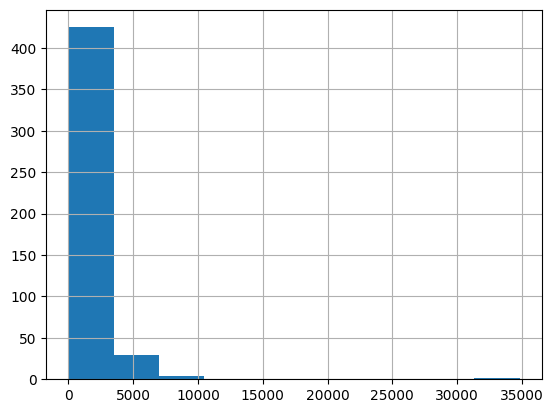
嵌入向量 API 有输入词元上限。先记录 CSV 每行的词元数,找出需要切分的文本。
## [中文] 计算每条文本的词元数并绘制分布图。
import tiktoken

## Load the cl100k_base tokenizer which is designed to work with the ada-002 model
tokenizer = tiktoken.get_encoding("cl100k_base")

df = pd.read_csv("processed/scraped.csv", index_col=0)
df.columns = ["title", "text"]

## Tokenize the text and save the number of tokens to a new column
df["n_tokens"] = df.text.apply(lambda x: len(tokenizer.encode(x)))

## Visualize the distribution of the number of tokens per row using a histogram
df.n_tokens.hist()
把长网页切成符合模型输入上限的文本块。
## [中文] 按词元上限切分长文本。
max_tokens = 500


## Function to split the text into chunks of a maximum number of tokens
def split_into_many(text, max_tokens=max_tokens):
    if max_tokens < 1:
        raise ValueError("max_tokens must be positive.")
    if not text.strip():
        return []

    sentences = text.split(". ")
    chunks = []
    chunk = ""
    for index, sentence in enumerate(sentences):
        if index < len(sentences) - 1:
            sentence += "."
        # Do not silently discard a sentence that needs finer-grained splitting.
        if len(tokenizer.encode(sentence)) > max_tokens:
            raise ValueError("A sentence exceeds max_tokens; split it before chunking.")

        candidate = f"{chunk} {sentence}" if chunk else sentence
        if len(tokenizer.encode(candidate)) > max_tokens:
            chunks.append(chunk)
            chunk = sentence
        else:
            chunk = candidate

    if chunk:
        chunks.append(chunk)
    return chunks


shortened = []

## Loop through the dataframe
for row in df.iterrows():
    # If the text is None, go to the next row
    if row[1]["text"] is None:
        continue

    # If the number of tokens is greater than the max number of tokens, split the text into chunks
    if row[1]["n_tokens"] > max_tokens:
        shortened += split_into_many(row[1]["text"])

    # Otherwise, add the text to the list of shortened texts
    else:
        shortened.append(row[1]["text"])
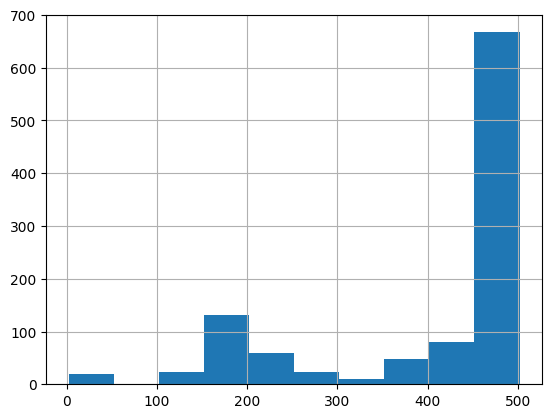
再次绘制直方图,检查切分后的长度分布。
## [中文] 查看切分后的词元分布。
df = pd.DataFrame(shortened, columns=["text"])
df["n_tokens"] = df.text.apply(lambda x: len(tokenizer.encode(x)))
df.n_tokens.hist()
用 text-embedding-3-small 为每个文本块生成嵌入向量。查询时也使用同一模型。更换模型后,先重建索引再检索。
## [中文] 逐块生成嵌入向量并保存结果。
from openai import OpenAI

client = OpenAI()

df["embeddings"] = df.text.apply(
    lambda x: client.embeddings.create(
        input=x, model="text-embedding-3-small"
    ).data[0].embedding
)

df.to_csv("processed/embeddings.csv")
df.head()
生成嵌入向量可能需要几分钟。
基于嵌入向量构建问答系统
先为用户问题生成嵌入向量,并从索引中查找最相关的文本块。再把问题和检索到的文本一起传给 Responses API 生成答案。
将嵌入向量转为一维 NumPy 数组,便于使用数组运算处理向量。
## [中文] 加载 CSV 并把嵌入向量恢复为数组。
from ast import literal_eval
import numpy as np

df = pd.read_csv("processed/embeddings.csv", index_col=0)
df["embeddings"] = df["embeddings"].apply(literal_eval).apply(np.array)

df.head()
用构建索引时的同一模型对问题生成嵌入向量。本例通过 NumPy 计算余弦距离,找出最接近的文本块。
## [中文] 计算问题和文本块的距离,按预算拼接上下文。
def distances_from_embeddings(query, embeddings, distance_metric="cosine"):
    if distance_metric != "cosine":
        raise ValueError("This example supports cosine distance only.")
    return [
        1 - float(np.dot(query, item) / (np.linalg.norm(query) * np.linalg.norm(item)))
        for item in embeddings
    ]

def create_context(question, df, max_len=1800):
    """
    Create a context for a question by finding the most similar context from the dataframe
    """

    # Get the embeddings for the question
    q_embeddings = (
        client.embeddings.create(input=question, model="text-embedding-3-small")
        .data[0]
        .embedding
    )

    # Get the distances from the embeddings
    df["distances"] = distances_from_embeddings(
        q_embeddings, df["embeddings"].values, distance_metric="cosine"
    )

    returns = []
    cur_len = 0

    # Sort by distance and add the text to the context until the context is too long
    for _, row in df.sort_values("distances", ascending=True).iterrows():
        # Add the length of the text to the current length
        cur_len += row["n_tokens"] + 4

        # If the context is too long, break
        if cur_len > max_len:
            break

        # Else add it to the text that is being returned
        returns.append(row["text"])

    # Return the context
    return "\n\n###\n\n".join(returns)
max_len 限制纳入上下文的检索文本词元数。使用 gpt-6-luna,通过 Responses API 传入上下文和问题,再从 response.output_text 读取答案。
## [中文] 调用 Responses API 并提取文本答案。
def answer_question(df, question, max_len=1800):
    context = create_context(question, df, max_len=max_len)
    response = client.responses.create(
        model="gpt-6-luna",
        instructions=(
            "Answer the question using only the supplied context. "
            "If the context doesn't answer the question, say \"I don't know.\""
        ),
        input=f"Context: {context}\n\nQuestion: {question}",
    )
    return response.output_text.strip()
先问一个索引能回答的问题,再问一个它无法回答的问题。如果索引含有 ChatGPT 的介绍,第一次应基于该内容作答,第二次应返回 “I don't know.”。
## [中文] 验证有依据和无依据的问题。
print(answer_question(df, "What is ChatGPT?"))
print(answer_question(df, "What did I have for breakfast today?"))
如果系统答不出本应知道的问题,请先检查原始文本文件,确认相关信息是否已进入索引。爬虫跳过原域名之外的网址,子域名的内容也可能未被收录。
本例每次回答都传入数据表,适合快速制作原型。生产环境可以使用向量数据库存储和检索向量。
















更多建议: