
 TRAE-AI编程



OpenAI Agents API 概览
Agents API通过OpenAI管理的API,让应用使用Codex智能体执行框架。
OpenAI管理会话、编排、上下文压缩及恢复,应用提供工具并选择执行环境。智能体可在沙箱执行代码、编辑文件、连接MCP服务器及生成产物。
端点、参数及响应字段见 API参考。
价格
模型用量按所选模型 API费率计算,OpenAI工具用标准费率,托管沙箱用容器费率。
试用示例
完整入门示例:
- 在托管沙箱创建并运行目录树脚本。
- 用子智能体比较发行说明,合并为一个答案。
应用示例:
- 事故响应智能体:调查告警,恢复操作前请求批准。
- Slack机器人:利用已连接工作工具调查请求。
- 数据分析师:以只读SQL回答数据仓库问题。
- GitHub问题调查器:复现问题并在GitHub分享发现。
- 文档审查器:使用政策技能和专项智能体审查文档。
核心概念
- 智能体(Agent):模型、指令、工具及可用MCP服务器。
- 环境(Environment):可选沙箱或计算机,供访问文件、加载技能和运行命令。
- 会话(Session):可持续存在的智能体实例,处理任务并响应输入。
- 事件与项目(Events and items):智能体接收的输入及会话执行中产生的输出。
一个会话的完整过程
从快速开始的托管沙箱入手:
- 创建会话:配置智能体,OpenAI创建环境。
- 提交任务:环境就绪后,用户输入启动一个工作轮次。
- 跟踪进度:用事件流或webhook获知完成或需要输入。
- 继续或引导:向同一会话发新任务,或在当前轮次工作中引导方向。
应用提交输入并接收事件,OpenAI运行智能体及托管沙箱。配置和限制见环境选项。
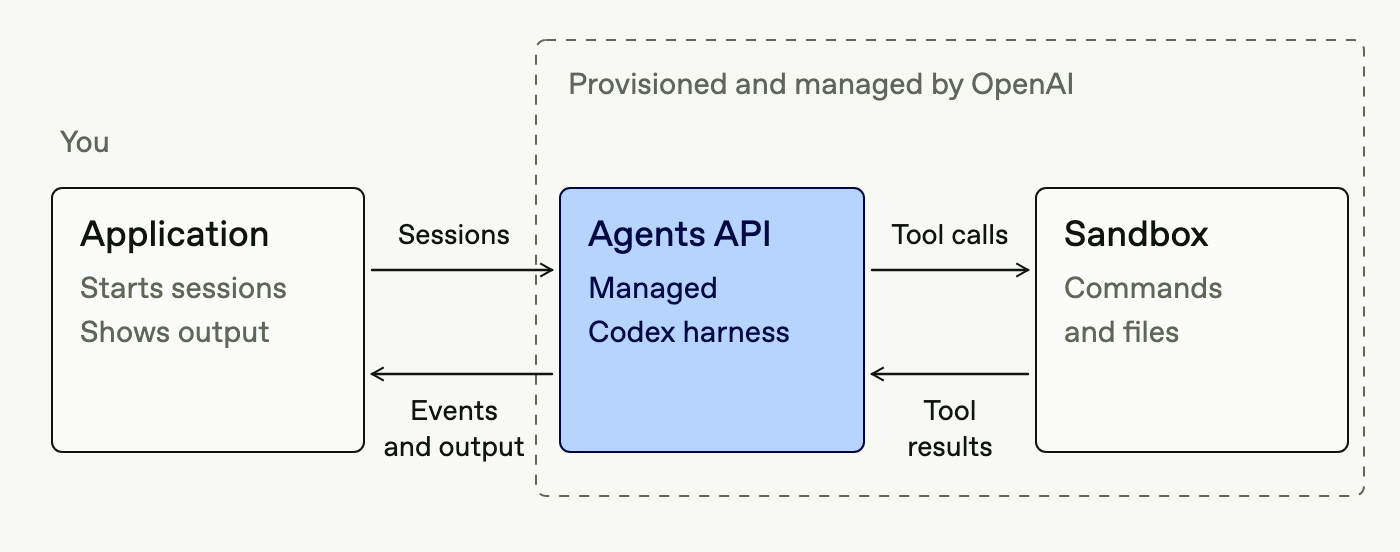
托管框架提供什么
- 在沙箱运行命令及代码。
- 应用相关技能和指令。
- 通过工具或MCP连接外部数据。
- 在工作期间接收方向引导。
- 总结较早工作,管理上下文窗口。
- 拆分任务并委派子智能体。
- 从已停止位置恢复会话。
密钥权限与SDK设置见快速开始前置条件。以下在创建会话时配置能力:
来源示例 1(javascript):
程序文字说明12:使用OpenAI文档MCP和网页搜索准确回答技术问题,适当时把独立研究任务委派子智能体。
程序文字说明13:研究如何为OpenAI智能体连接MCP服务器,检查近期更新,并总结推荐配置。
程序文字说明14:此拼接指令要求使用OpenAI文档MCP与网页搜索,准确答题并适当委派独立研究。
程序文字说明33:此拼接输入要求研究MCP连接方式、近期更新和推荐配置。
// [中文] 示例 1:托管框架提供什么。
// [中文] 创建会话,保存返回会话 ID;设置 stream 时继续读取事件,创建请求本身不保证任务成功。
// [中文] 本段涉及的请求或服务地址:https://developers.openai.com/mcp;示例占位地址需替换为实际资源。
import OpenAI from "openai";

const client = new OpenAI();

const session = await client.beta.agents.sessions.create({
  agent: {
    model: "gpt-6-astra",
    instructions:
      "Use the OpenAI documentation MCP and web search to answer technical questions accurately. Delegate independent research tasks to subagents when useful.",
    tools: [
      { type: "programmatic_tool_calling" },
      {
        type: "mcp",
        server_label: "openai_docs",
        transport: {
          type: "http",
          server_url: "https://developers.openai.com/mcp",
        },
      },
      { type: "web_search" },
    ],
    multi_agent: { enabled: true, max_concurrent_subagents: 4 },
  },
  environment: {
    type: "self_hosted",
    workspace_directory: "/workspace",
    capability_directories: ["/workspace/capabilities/skills"],
  },
  input: [
    {
      role: "user",
      content: [
        {
          type: "input_text",
          text: "Research how to connect an MCP server to an OpenAI agent, check for recent updates, and summarize the recommended setup.",
        },
      ],
    },
  ],
});
console.log(session.id);
来源示例 2(python):
沿用程序文字说明12。
沿用程序文字说明13。
沿用程序文字说明14。
沿用程序文字说明33。
## [中文] 示例 2:托管框架提供什么。
## [中文] 创建会话,保存返回会话 ID;设置 stream 时继续读取事件,创建请求本身不保证任务成功。
## [中文] 本段涉及的请求或服务地址:https://developers.openai.com/mcp;示例占位地址需替换为实际资源。
from openai import OpenAI

client = OpenAI()

session = client.beta.agents.sessions.create(
    agent={
        "model": "gpt-6-astra",
        "instructions": "Use the OpenAI documentation MCP and web search to answer technical questions accurately. Delegate independent research tasks to subagents when useful.",
        "tools": [
            {"type": "programmatic_tool_calling"},
            {
                "type": "mcp",
                "server_label": "openai_docs",
                "transport": {
                    "type": "http",
                    "server_url": "https://developers.openai.com/mcp",
                },
            },
            {"type": "web_search"},
        ],
        "multi_agent": {"enabled": True, "max_concurrent_subagents": 4},
    },
    environment={
        "type": "self_hosted",
        "workspace_directory": "/workspace",
        "capability_directories": ["/workspace/capabilities/skills"],
    },
    input=[
        {
            "role": "user",
            "content": [
                {
                    "type": "input_text",
                    "text": "Research how to connect an MCP server to an OpenAI agent, check for recent updates, and summarize the recommended setup.",
                }
            ],
        }
    ],
)
print(session.id)
来源示例 3(go):
沿用程序文字说明12。
沿用程序文字说明13。
沿用程序文字说明14。
沿用程序文字说明33。
// [中文] 示例 3:托管框架提供什么。
// [中文] 创建会话,保存返回会话 ID;设置 stream 时继续读取事件,创建请求本身不保证任务成功。
// [中文] 本段涉及的请求或服务地址:https://developers.openai.com/mcp;示例占位地址需替换为实际资源。
import (
    "context"
    "fmt"
    "github.com/openai/openai-go/v3"
)

ctx := context.Background()
client := openai.NewClient()
session, err := client.Beta.Agents.Sessions.New(ctx, openai.BetaAgentSessionNewParams{Agent: openai.BetaAgentSessionNewParamsAgent{Model: openai.String("gpt-6-astra"),
    Instructions: openai.String("Use the OpenAI documentation MCP and web search to answer technical questions accurately. Delegate independent research tasks to subagents when useful."),
    Tools: []openai.AgentToolParamUnion{openai.AgentToolParamUnion{OfParamProgrammaticToolCalling: &openai.AgentToolParamProgrammaticToolCalling{}},
        openai.AgentToolParamUnion{OfParamMcp: &openai.AgentToolParamMcp{ServerLabel: "openai_docs",
            Transport: openai.McpTransportParamUnion{OfParamHTTP: &openai.McpTransportParamHTTP{ServerURL: "https://developers.openai.com/mcp"}}}},
        openai.AgentToolParamUnion{OfParamWebSearch: &openai.AgentToolParamWebSearch{}}},
    MultiAgent: openai.MultiAgentConfigParam{Enabled: true,
        MaxConcurrentSubagents: openai.Int(4)}},
    Environment: openai.EnvironmentParamUnion{OfParamSelfHosted: &openai.EnvironmentParamSelfHosted{WorkspaceDirectory: "/workspace",
        CapabilityDirectories: []string{"/workspace/capabilities/skills"}}},
    Input: openai.BetaAgentSessionNewParamsInputUnion{OfArrayOfInputMessages: []openai.AgentSessionInputMessageParam{openai.AgentSessionInputMessageParam{Content: []openai.InputContentParamUnion{openai.InputContentParamUnion{OfParamInputText: &openai.InputContentParamInputText{Text: "Research how to connect an MCP server to an OpenAI agent, check for recent updates, and summarize the recommended setup."}}}}}}})
if err != nil {
    panic(err)
}
fmt.Println(session.ID)
来源示例 4(java):
沿用程序文字说明14。
沿用程序文字说明33。
// [中文] 示例 4:托管框架提供什么。
// [中文] 创建会话,保存返回会话 ID;设置 stream 时继续读取事件,创建请求本身不保证任务成功。
// [中文] 本段涉及的请求或服务地址:https://developers.openai.com/mcp;示例占位地址需替换为实际资源。
import com.openai.client.OpenAIClient;
import com.openai.client.okhttp.OpenAIOkHttpClient;
import com.openai.models.beta.agents.AgentToolParam;
import com.openai.models.beta.agents.EnvironmentParam;
import com.openai.models.beta.agents.McpTransportParam;
import com.openai.models.beta.agents.MultiAgentConfigParam;
import com.openai.models.beta.agents.sessions.SessionCreateParams;
import java.util.List;

OpenAIClient client = OpenAIOkHttpClient.fromEnv();
var session =
    client
        .beta()
        .agents()
        .sessions()
        .create(
            SessionCreateParams.builder()
                .agent(
                    SessionCreateParams.Agent.builder()
                        .model("gpt-6-astra")
                        .instructions(
                            "Use the OpenAI documentation MCP and web search to answer"
                                + " technical questions accurately. Delegate independent"
                                + " research tasks to subagents when useful.")
                        .addTool(AgentToolParam.ProgrammaticToolCalling.builder().build())
                        .addTool(
                            AgentToolParam.Mcp.builder()
                                .serverLabel("openai_docs")
                                .transport(
                                    McpTransportParam.Http.builder()
                                        .serverUrl("https://developers.openai.com/mcp")
                                        .build())
                                .build())
                        .addTool(AgentToolParam.WebSearch.builder().build())
                        .multiAgent(
                            MultiAgentConfigParam.builder()
                                .enabled(true)
                                .maxConcurrentSubagents(4L)
                                .build())
                        .build())
                .environment(
                    EnvironmentParam.SelfHosted.builder()
                        .workspaceDirectory("/workspace")
                        .capabilityDirectories(List.of("/workspace/capabilities/skills"))
                        .build())
                .input(
                    "Research how to connect an MCP server to an OpenAI agent, check for recent"
                        + " updates, and summarize the recommended setup.")
                .build());
System.out.println(session.id());
来源示例 5(ruby):
沿用程序文字说明12。
沿用程序文字说明13。
沿用程序文字说明14。
沿用程序文字说明33。
## [中文] 示例 5:托管框架提供什么。
## [中文] 创建会话,保存返回会话 ID;设置 stream 时继续读取事件,创建请求本身不保证任务成功。
## [中文] 本段涉及的请求或服务地址:https://developers.openai.com/mcp;示例占位地址需替换为实际资源。
require "openai"

client = OpenAI::Client.new

session = client.beta.agents.sessions.create(
  agent: {
    model: "gpt-6-astra",
    instructions: "Use the OpenAI documentation MCP and web search to answer technical questions accurately. Delegate independent research tasks to subagents when useful.",
    tools: [
      { type: "programmatic_tool_calling" },
      {
        type: "mcp",
        server_label: "openai_docs",
        transport: {
          type: "http",
          server_url: "https://developers.openai.com/mcp"
        }
      },
      { type: "web_search" }
    ],
    multi_agent: {
      enabled: true,
      max_concurrent_subagents: 4
    }
  },
  environment: {
    type: "self_hosted",
    workspace_directory: "/workspace",
    capability_directories: ["/workspace/capabilities/skills"]
  },
  input: [
    {
      role: "user",
      content: [
        {
          type: "input_text",
          text: "Research how to connect an MCP server to an OpenAI agent, check for recent updates, and summarize the recommended setup."
        }
      ]
    }
  ]
)
puts session.id
来源示例 6(bash):
沿用程序文字说明12。
沿用程序文字说明13。
沿用程序文字说明14。
沿用程序文字说明33。
## [中文] 示例 6:托管框架提供什么。
## [中文] 本段涉及的请求或服务地址:https://api.openai.com/v1/agents/sessions、https://developers.openai.com/mcp;示例占位地址需替换为实际资源。
curl -sS -X POST "https://api.openai.com/v1/agents/sessions" \
  -H "OpenAI-Beta: agents=v1" \
  -H "Authorization: Bearer $OPENAI_API_KEY" \
  -H "Content-Type: application/json" \
  -d '{
    "agent": {
      "model": "gpt-6-astra",
      "instructions": "Use the OpenAI documentation MCP and web search to answer technical questions accurately. Delegate independent research tasks to subagents when useful.",
      "tools": [
        {
          "type": "programmatic_tool_calling"
        },
        {
          "type": "mcp",
          "server_label": "openai_docs",
          "transport": {
            "type": "http",
            "server_url": "https://developers.openai.com/mcp"
          }
        },
        {
          "type": "web_search"
        }
      ],
      "multi_agent": {
        "enabled": true,
        "max_concurrent_subagents": 4
      }
    },
    "environment": {
      "type": "self_hosted",
      "workspace_directory": "/workspace",
      "capability_directories": ["/workspace/capabilities/skills"]
    },
    "input": [
      {
        "role": "user",
        "content": [
          {
            "type": "input_text",
            "text": "Research how to connect an MCP server to an OpenAI agent, check for recent updates, and summarize the recommended setup."
          }
        ]
      }
    ]
}'运行时比较见Agents概览,AWS对应服务见 Bedrock Managed Agents。
Agents API保留会话状态,可跨轮次继续,无需重建全部对话上下文。不再需要时可删除会话和已发布产物。目前只支持美国数据驻留,不支持零数据保留(ZDR);选择自托管沙箱也不会使Agents API符合ZDR。驻留和保留要求见数据控制。
















更多建议: