
 TRAE-AI编程



OpenAI 推理模型
推理模型在生成回答前使用内部推理词元,以规划任务、有效使用工具、比较替代方案、处理含糊信息,并解决较难的多步骤问题。它适合复杂问题求解、编程、科学推理和多步骤智能体工作流,也是 Codex CLI 的重要模型选择。
本页原文建议,多数推理任务可从 gpt-6-astra 开始;更关注费用时可考虑 gpt-5.6-terra、gpt-5.6-luna 等较经济选项。GPT-5.6、GPT-6 家族还提供 Pro 推理模式。工具与状态续接通常优先使用 Responses API;Chat Completions 的支持范围须按具体模型检查。
开始使用推理
调用 Responses API,设置模型及 reasoning.effort。以下保留官方提供的 JavaScript、Python、Go、Java、C#、Ruby 和 cURL 示例。运行 SDK 示例前应按快速开始准备对应依赖和 OPENAI_API_KEY;不要把密钥直接写入代码。
设置推理模型与推理力度,创建Responses响应并读取结果
// 设置推理模型与推理力度,创建Responses响应并读取结果
import OpenAI from "openai";

const openai = new OpenAI();

const prompt = `
Write a bash script that takes a matrix represented as a string with
format '[1,2],[3,4],[5,6]' and prints the transpose in the same format.
`;

const response = await openai.responses.create({
  model: "gpt-6-astra",
  reasoning: { effort: "low" },
  input: [
    {
      role: "user",
      content: prompt,
    },
  ],
});

console.log(response.output_text);
设置推理模型与推理力度,创建Responses响应并读取结果
## 设置推理模型与推理力度,创建Responses响应并读取结果
from openai import OpenAI

client = OpenAI()

prompt = """
Write a bash script that takes a matrix represented as a string with
format '[1,2],[3,4],[5,6]' and prints the transpose in the same format.
"""

response = client.responses.create(
    model="gpt-6-astra",
    reasoning={"effort": "low"},
    input=[{"role": "user", "content": prompt}],
)

print(response.output_text)
设置推理模型与推理力度,创建Responses响应并读取结果
// 设置推理模型与推理力度,创建Responses响应并读取结果
package main

import (
    "context"
    "fmt"

    "github.com/openai/openai-go/v3"
    "github.com/openai/openai-go/v3/responses"
)

func main() {
    client := openai.NewClient()
    prompt := `Write a bash script that takes a matrix represented as a string with
format '[1,2],[3,4],[5,6]' and prints the transpose in the same format.`

    response, err := client.Responses.New(context.Background(), responses.ResponseNewParams{
        Model: "gpt-6-astra",
        Reasoning: responses.ReasoningParam{
            Effort: responses.ReasoningEffortLow,
        },
        Input: responses.ResponseNewParamsInputUnion{
            OfString: openai.String(prompt),
        },
    })
    if err != nil {
        panic(err)
    }

    fmt.Println(response.OutputText())
}
设置推理模型与推理力度,创建Responses响应并读取结果
// 设置推理模型与推理力度,创建Responses响应并读取结果
import com.openai.client.OpenAIClient;
import com.openai.client.okhttp.OpenAIOkHttpClient;
import com.openai.models.Reasoning;
import com.openai.models.ReasoningEffort;
import com.openai.models.responses.ResponseCreateParams;

String prompt =
    """
    Write a bash script that takes a matrix represented as a string with format
    '[1,2],[3,4],[5,6]' and prints the transpose in the same format.
    """
        .strip();

ResponseCreateParams params =
    ResponseCreateParams.builder()
        .model("gpt-6-astra")
        .input(prompt)
        .reasoning(Reasoning.builder().effort(ReasoningEffort.LOW).build())
        .build();

client.responses().create(params).output().stream()
    .flatMap(item -> item.message().stream())
    .flatMap(message -> message.content().stream())
    .flatMap(content -> content.outputText().stream())
    .forEach(text -> System.out.println(text.text()));
设置推理模型与推理力度,创建Responses响应并读取结果
// 设置推理模型与推理力度,创建Responses响应并读取结果
using OpenAI.Responses;
#pragma warning disable OPENAI001

string key = Environment.GetEnvironmentVariable("OPENAI_API_KEY")!;
ResponsesClient client = new(key);

string prompt =
    """
    Write a bash script that takes a matrix represented as a string with format
    '[1,2],[3,4],[5,6]' and prints the transpose in the same format.
    """;
CreateResponseOptions options = new()
{
    Model = "gpt-6-astra",
    ReasoningOptions = new ResponseReasoningOptions
    {
        ReasoningEffortLevel = ResponseReasoningEffortLevel.Low,
    },
};
options.InputItems.Add(ResponseItem.CreateUserMessageItem(prompt));

ResponseResult response = await client.CreateResponseAsync(options);

Console.WriteLine(response.GetOutputText());
设置推理模型与推理力度,创建Responses响应并读取结果
## 设置推理模型与推理力度,创建Responses响应并读取结果
require "openai"

client = OpenAI::Client.new
prompt = <<~PROMPT
  Write a bash script that takes a matrix represented as a string with format
  '[1,2],[3,4],[5,6]' and prints the transpose in the same format.
PROMPT

response = client.responses.create(
  model: "gpt-6-astra",
  reasoning: { effort: :low },
  input: prompt
)

puts(response.output_text)
设置推理模型与推理力度,创建Responses响应并读取结果
## 设置推理模型与推理力度,创建Responses响应并读取结果
curl https://api.openai.com/v1/responses \
  -H "Content-Type: application/json" \
  -H "Authorization: Bearer $OPENAI_API_KEY" \
  -d '{
    "model": "gpt-6-astra",
    "reasoning": {"effort": "low"},
    "input": [
      {
        "role": "user",
        "content": "Write a bash script that takes a matrix represented as a string with format \"[1,2],[3,4],[5,6]\" and prints the transpose in the same format."
      }
    ]
  }'
<a id="reasoning-effort"></a>
推理力度
reasoning.effort 控制模型为任务投入的推理程度。支持值依模型而不同,可能包括 none、minimal、low、medium、high、xhigh、max。较低力度偏向速度与较少词元,较高力度允许更充分推理;模型也会按问题难度自适应分配工作。
Astra 不支持 none,在 Responses 的 reasoning.effort 或 Chat Completions 的 reasoning_effort 中设置它会返回 HTTP 400。GPT-6.1 Sol 不支持 none、minimal,默认 medium。这两种模型的函数调用都需要 Responses,不能因 Chat Completions 支持文本请求就推断支持函数工具。
默认值也依模型而不同。例如 gpt-5.5 默认 medium,可作为平衡质量、可靠性与性能的起点。
| 力度 | 适合的情况 |
|---|---|
none |
不需要推理或多次工具链的低延迟任务,如语音、快速检索、分类。对延迟敏感的gpt-5.5任务,原页建议先试low,再按需要比较none |
low |
以小幅增加延迟换取高效推理;数据分析、草稿、执行型编程、客服,以及需要工具、计划、搜索或多步决策的任务 |
medium |
质量与可靠性重要,涉及规划、复杂推理与判断;智能体编程、研究、表格/幻灯片及长任务委派的均衡起点 |
high |
高难度推理、复杂调试、深入规划与高价值工作;在代表任务上比较medium与high |
xhigh |
深度研究、异步长任务、安全与代码审查、高要求编程;仅在评测收益值得额外延迟与费用时使用 |
max |
最复杂任务的最高推理力度;已有xhigh流程可单独评估是否带来更好结果 |
延迟敏感应用可要求模型先生成简短开场说明,再深入工作,以缩短首次可见输出时间。选择前仍需核对目标模型实际支持的力度子集。
<a id="reasoning-mode"></a>
推理模式
GPT-5.6 与 GPT-6 在 Responses API 中支持 standard、pro,默认 standard。难任务能接受更高延迟及词元消耗时,可设置 reasoning.mode: "pro"。
模式与力度相互独立:模式选择执行方式,力度控制该模式中的思考投入。GPT-5.6两种模式省略力度时均默认 medium;GPT-6.1 Sol、GPT-6 Sol、GPT-6 Luna 也默认 medium。
在Responses请求中启用pro推理模式
## 在Responses请求中启用pro推理模式
curl https://api.openai.com/v1/responses \
  -H "Content-Type: application/json" \
  -H "Authorization: Bearer $OPENAI_API_KEY" \
  -d '{
    "model": "gpt-6.1-sol",
    "reasoning": {
      "mode": "pro",
      "effort": "medium"
    },
    "input": "Review this database migration plan and identify potential failure modes."
  }'
Pro 会汇总生成最终答案所执行的模型工作,并按所选模型的标准词元价格计费;比 Standard 使用更多模型工作,通常消耗更多词元并增加费用。原有独立 Pro 模型 ID 保持各自行为与价格。
推理如何工作
除输入和输出词元外,推理模型使用内部推理词元,将问题拆解并考虑不同解决方法。GPT-5.5、GPT-5.4 等支持交错思考,可以在推理前、推理之间以及工具调用之间生成可见内容。
GPT-5.6之前的模型在多步对话中默认延续输入与输出,不把更早轮次的推理渲染到下一次模型上下文;GPT-5.6默认可以利用先前可用推理。支持的模型可用 reasoning.context 选择行为。
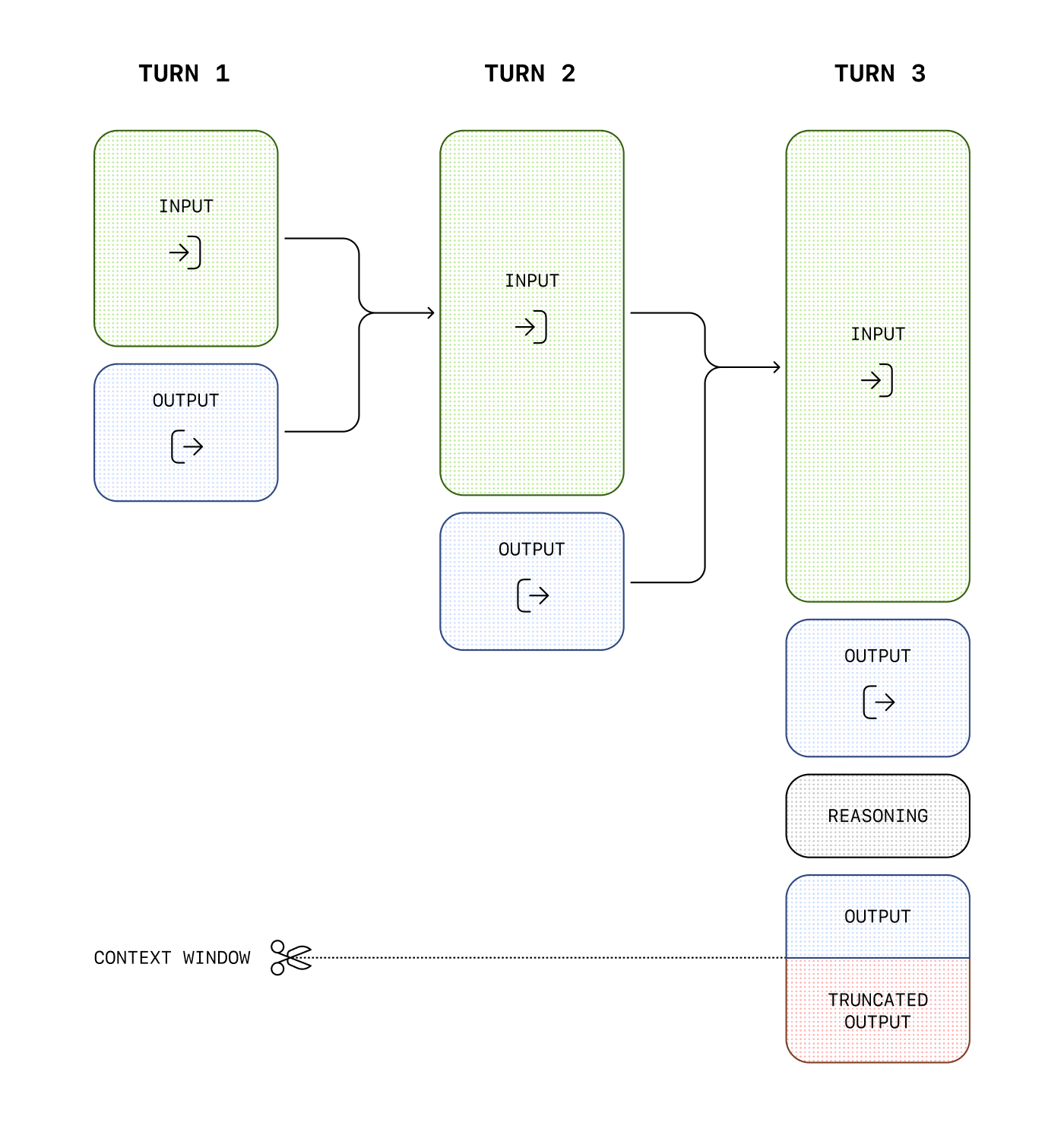
原始推理词元不能通过API直接读取,但会占上下文空间,并按输出词元计费。推理摘要不等于原始内部思维。
控制费用
max_output_tokens 限制模型生成的总词元,包括推理、可见输出,以及不可见格式词元。不要把它只当作最终正文长度限制。具体计量见输出词元统计。
管理上下文窗口
推理可能消耗数百到数万个词元,应预留足够空间。实际推理用量在响应 usage.output_tokens_details 中查看:
响应usage数据示意;查看推理词元用量,JSON中不添加注释
{
  "usage": {
    "input_tokens": 75,
    "input_tokens_details": {
      "cached_tokens": 0
    },
    "output_tokens": 1186,
    "output_tokens_details": {
      "reasoning_tokens": 1024
    },
    "total_tokens": 1261
  }
}
上下文长度随模型与快照而不同,应从模型详情确认。
为推理和输出预留空间
生成达到上下文或 max_output_tokens 上限时,响应可能为 status: "incomplete",并在 incomplete_details.reason 返回 max_output_tokens。这种情况可能发生在任何可见文字出现前,因此即使没有得到可见答案,也可能已消耗输入与推理费用。
应增加可用上下文或输出预算。原页建议初次实验先为推理与输出预留至少25,000词元,再按实际用量调整;这不是每个模型、每个任务都必须消耗的固定数量。
处理incomplete响应,区分输出预算不足与正常完成
// 处理incomplete响应,区分输出预算不足与正常完成
import OpenAI from "openai";

const openai = new OpenAI();

const prompt = `
Write a bash script that takes a matrix represented as a string with
format '[1,2],[3,4],[5,6]' and prints the transpose in the same format.
`;

const response = await openai.responses.create({
  model: "gpt-6-astra",
  reasoning: { effort: "medium" },
  input: [
    {
      role: "user",
      content: prompt,
    },
  ],
  max_output_tokens: 300,
});

if (
  response.status === "incomplete" &&
  response.incomplete_details.reason === "max_output_tokens"
) {
  console.log("Ran out of tokens");
  if (response.output_text?.length > 0) {
    console.log("Partial output:", response.output_text);
  } else {
    console.log("Ran out of tokens during reasoning");
  }
}
处理incomplete响应,区分输出预算不足与正常完成
## 处理incomplete响应,区分输出预算不足与正常完成
from openai import OpenAI

client = OpenAI()

prompt = """
Write a bash script that takes a matrix represented as a string with
format '[1,2],[3,4],[5,6]' and prints the transpose in the same format.
"""

response = client.responses.create(
    model="gpt-6-astra",
    reasoning={"effort": "medium"},
    input=[{"role": "user", "content": prompt}],
    max_output_tokens=300,
)

if (
    response.status == "incomplete"
    and response.incomplete_details.reason == "max_output_tokens"
):
    print("Ran out of tokens")
    if response.output_text:
        print("Partial output:", response.output_text)
    else:
        print("Ran out of tokens during reasoning")
处理incomplete响应,区分输出预算不足与正常完成
// 处理incomplete响应,区分输出预算不足与正常完成
package main

import (
    "context"
    "fmt"

    "github.com/openai/openai-go/v3"
    "github.com/openai/openai-go/v3/responses"
)

func main() {
    client := openai.NewClient()
    prompt := `Write a bash script that takes a matrix represented as a string with
format '[1,2],[3,4],[5,6]' and prints the transpose in the same format.`

    response, err := client.Responses.New(context.Background(), responses.ResponseNewParams{
        Model:           "gpt-6-astra",
        MaxOutputTokens: openai.Int(300),
        Reasoning: responses.ReasoningParam{
            Effort: responses.ReasoningEffortMedium,
        },
        Input: responses.ResponseNewParamsInputUnion{
            OfString: openai.String(prompt),
        },
    })
    if err != nil {
        panic(err)
    }

    if response.Status == responses.ResponseStatusIncomplete {
        fmt.Println("Ran out of tokens")
        if text := response.OutputText(); text != "" {
            fmt.Println("Partial output:", text)
        }
    }
}
处理incomplete响应,区分输出预算不足与正常完成
// 处理incomplete响应,区分输出预算不足与正常完成
import com.openai.client.OpenAIClient;
import com.openai.client.okhttp.OpenAIOkHttpClient;
import com.openai.models.Reasoning;
import com.openai.models.ReasoningEffort;
import com.openai.models.responses.Response;
import com.openai.models.responses.ResponseCreateParams;
import com.openai.models.responses.ResponseStatus;

ResponseCreateParams params =
    ResponseCreateParams.builder()
        .model("gpt-6-astra")
        .input(
            "Write a bash script that takes a matrix represented as a string with format "
                + "'[1,2],[3,4],[5,6]' and prints the transpose in the same format.")
        .maxOutputTokens(300)
        .reasoning(Reasoning.builder().effort(ReasoningEffort.MEDIUM).build())
        .build();

var response = client.responses().create(params);
if (response.status().filter(ResponseStatus.INCOMPLETE::equals).isPresent()
    && response
        .incompleteDetails()
        .flatMap(Response.IncompleteDetails::reason)
        .filter(Response.IncompleteDetails.Reason.MAX_OUTPUT_TOKENS::equals)
        .isPresent()) {
  System.out.println("Ran out of tokens");
  response.output().stream()
      .flatMap(item -> item.message().stream())
      .flatMap(message -> message.content().stream())
      .flatMap(content -> content.outputText().stream())
      .forEach(text -> System.out.println("Partial output: " + text.text()));
}
处理incomplete响应,区分输出预算不足与正常完成
// 处理incomplete响应,区分输出预算不足与正常完成
using OpenAI.Responses;
#pragma warning disable OPENAI001

string key = Environment.GetEnvironmentVariable("OPENAI_API_KEY")!;
ResponsesClient client = new(key);

CreateResponseOptions options = new()
{
    Model = "gpt-6-astra",
    MaxOutputTokenCount = 300,
    ReasoningOptions = new ResponseReasoningOptions
    {
        ReasoningEffortLevel = ResponseReasoningEffortLevel.Medium,
    },
};
options.InputItems.Add(
    ResponseItem.CreateUserMessageItem("Write a bash script that transposes a matrix.")
);

ResponseResult response = await client.CreateResponseAsync(options);
if (
    response.Status == ResponseStatus.Incomplete
    && response.IncompleteStatusDetails?.Reason == ResponseIncompleteStatusReason.MaxOutputTokens
)
{
    Console.WriteLine("The response ended before all output tokens were generated.");
    string partialOutput = response.GetOutputText();
    Console.WriteLine(
        string.IsNullOrWhiteSpace(partialOutput)
            ? "Ran out of tokens during reasoning."
            : $"Partial output: {partialOutput}"
    );
}
else if (
    response.Status == ResponseStatus.Incomplete
    && response.IncompleteStatusDetails?.Reason == ResponseIncompleteStatusReason.ContentFilter
)
{
    Console.WriteLine("The response was interrupted by the content filter.");
}
else if (response.Status == ResponseStatus.Completed)
{
    Console.WriteLine(response.GetOutputText());
}
else
{
    throw new InvalidOperationException($"The response ended with status: {response.Status}");
}
处理incomplete响应,区分输出预算不足与正常完成
## 处理incomplete响应,区分输出预算不足与正常完成
require "openai"

client = OpenAI::Client.new
prompt = <<~PROMPT
  Write a bash script that takes a matrix represented as a string with format
  '[1,2],[3,4],[5,6]' and prints the transpose in the same format.
PROMPT

response = client.responses.create(
  model: "gpt-6-astra",
  max_output_tokens: 300,
  reasoning: { effort: :medium },
  input: prompt
)

if response.status == OpenAI::Responses::ResponseStatus::INCOMPLETE
  puts("Ran out of tokens")
  puts("Partial output: #{response.output_text}") unless response.output_text.empty?
end
<a id="preserve-reasoning-across-calls"></a>
跨调用保留推理
会话状态提供可见历史,推理状态则允许支持的模型把更早轮次中兼容的推理项用于后续上下文。它提供连续性,不暴露原始推理文本。
reasoning.context |
行为 |
|---|---|
auto或省略 |
使用所选模型默认值 |
current_turn |
仅使用当前活动轮次的推理,不把更早轮次推理渲染到下一次采样 |
all_turns |
利用可用、兼容的更早推理项;GPT-5.6家族与GPT-6.1 Sol支持 |
GPT-5.6家族默认 all_turns,较早模型默认 current_turn。响应的 reasoning.context 会报告实际模式,应逐次确认;设置不会凭空创建缺失的推理项。
all_turns 只有能访问先前响应时才生效,可通过 previous_response_id、Conversation 或完整手动重放提供历史。首个请求没有旧推理,所以两种模式行为相同。推理仅能在同一家族兼容模型间重用,例如5.6 Sol/Terra/Luna可互用,但5.6与5.5之间不延续;跨家族时即使设为all_turns,不兼容推理也会被忽略。
使用已存储响应续接
previous_response_id 是简洁的有状态集成方式:
通过previous_response_id续接历史并保留兼容推理状态
// 通过previous_response_id续接历史并保留兼容推理状态
import OpenAI from "openai";

const client = new OpenAI();

const first = await client.responses.create({
  model: "gpt-6.1-sol",
  input: "Inspect this repository and identify the likely bug.",
  reasoning: { context: "current_turn" },
});

const second = await client.responses.create({
  model: "gpt-6.1-sol",
  previous_response_id: first.id,
  input: "Now patch the bug and explain the change.",
  reasoning: { context: "all_turns" },
});

console.log(second.output_text);
通过previous_response_id续接历史并保留兼容推理状态
## 通过previous_response_id续接历史并保留兼容推理状态
from openai import OpenAI

client = OpenAI()
model = "gpt-6.1-sol"

first = client.responses.create(
    model=model,
    input="Inspect this repository and identify the likely bug.",
    reasoning={"context": "current_turn"},
)

second = client.responses.create(
    model=model,
    previous_response_id=first.id,
    input="Now patch the bug and explain the change.",
    reasoning={"context": "all_turns"},
)

print(second.output_text)
通过previous_response_id续接历史并保留兼容推理状态
// 通过previous_response_id续接历史并保留兼容推理状态
package main

import (
    "context"
    "fmt"

    "github.com/openai/openai-go/v3"
    "github.com/openai/openai-go/v3/responses"
)

func main() {
    client := openai.NewClient()
    model := "gpt-6.1-sol"

    first, err := client.Responses.New(context.Background(), responses.ResponseNewParams{
        Model: model,
        Input: responses.ResponseNewParamsInputUnion{
            OfString: openai.String("Inspect this repository and identify the likely bug."),
        },
        Reasoning: responses.ReasoningParam{
            Context: responses.ReasoningContextCurrentTurn,
        },
    })
    if err != nil {
        panic(err)
    }

    second, err := client.Responses.New(context.Background(), responses.ResponseNewParams{
        Model:              model,
        PreviousResponseID: openai.String(first.ID),
        Input: responses.ResponseNewParamsInputUnion{
            OfString: openai.String("Now patch the bug and explain the change."),
        },
        Reasoning: responses.ReasoningParam{
            Context: responses.ReasoningContextAllTurns,
        },
    })
    if err != nil {
        panic(err)
    }

    fmt.Println(second.OutputText())
}
通过previous_response_id续接历史并保留兼容推理状态
// 通过previous_response_id续接历史并保留兼容推理状态
import com.openai.client.OpenAIClient;
import com.openai.client.okhttp.OpenAIOkHttpClient;
import com.openai.core.JsonValue;
import com.openai.models.Reasoning;
import com.openai.models.responses.ResponseCreateParams;

var first =
    client
        .responses()
        .create(
            ResponseCreateParams.builder()
                .model("gpt-6.1-sol")
                .input("Inspect this repository and identify the likely bug.")
                .reasoning(
                    Reasoning.builder()
                        .putAdditionalProperty("context", JsonValue.from("current_turn"))
                        .build())
                .build());

var second =
    client
        .responses()
        .create(
            ResponseCreateParams.builder()
                .model("gpt-6.1-sol")
                .input("Now patch the bug and explain the change.")
                .previousResponseId(first.id())
                .reasoning(
                    Reasoning.builder()
                        .putAdditionalProperty("context", JsonValue.from("all_turns"))
                        .build())
                .build());
second.output().stream()
    .flatMap(item -> item.message().stream())
    .flatMap(message -> message.content().stream())
    .flatMap(content -> content.outputText().stream())
    .forEach(text -> System.out.println(text.text()));
通过previous_response_id续接历史并保留兼容推理状态
## 通过previous_response_id续接历史并保留兼容推理状态
require "openai"

client = OpenAI::Client.new

first = client.responses.create(
  model: "gpt-6.1-sol",
  input: "Inspect this repository and identify the likely bug.",
  reasoning: { context: :current_turn }
)

second = client.responses.create(
  model: "gpt-6.1-sol",
  previous_response_id: first.id,
  input: "Now patch the bug and explain the change.",
  reasoning: { context: :all_turns }
)

puts(second.output_text)
旧推理已无用途时可选择 current_turn。推理项仍可在载荷中保留以维持历史连续性,但服务不会把它们渲染进新采样,可减少长工作流实际使用的上下文。
不存储响应时保留推理
store: false 或组织采用零数据保留(ZDR)时,属于无状态模式。输出数组中的推理项默认包含 encrypted_content。旧的 include: ["reasoning.encrypted_content"] 仍为兼容而接受,但不再必需。
不存储响应时获取加密推理项;不需要额外include字段
## 不存储响应时获取加密推理项;不需要额外include字段
curl https://api.openai.com/v1/responses \
  -H "Content-Type: application/json" \
  -H "Authorization: Bearer $OPENAI_API_KEY" \
  -d '{
    "model": "gpt-6-astra",
    "store": false,
    "reasoning": {"effort": "medium"},
    "input": "What is the weather like today?",
    "tools": [ ... function config here ... ]
  }'
要在此模式使用all_turns,应保存全部输出项,追加下一条用户消息,再完整回放。加密内容是不透明数据,应原样保存和回传。
store为false时保留全部输出项并重放完整历史
// store为false时保留全部输出项并重放完整历史
import OpenAI from "openai";
import { toResponseInputItems } from "openai/lib/responses/ResponseInputItems";

const client = new OpenAI();

const history = [
  {
    role: "user",
    content: "Inspect this repository and identify the likely bug.",
  },
];

const first = await client.responses.create({
  model: "gpt-6.1-sol",
  store: false,
  input: history,
  reasoning: { context: "current_turn" },
});

// Keep replayable output, including encrypted reasoning and assistant phase.
history.push(...toResponseInputItems(first.output));
history.push({
  role: "user",
  content: "Now patch the bug and explain the change.",
});

const second = await client.responses.create({
  model: "gpt-6.1-sol",
  store: false,
  input: history,
  reasoning: { context: "all_turns" },
});

console.log(second.output_text);
store为false时保留全部输出项并重放完整历史
## store为false时保留全部输出项并重放完整历史
from openai import OpenAI

client = OpenAI()
model = "gpt-6.1-sol"

history = [
    {
        "role": "user",
        "content": "Inspect this repository and identify the likely bug.",
    }
]

first = client.responses.create(
    model=model,
    store=False,
    input=history,
    reasoning={"context": "current_turn"},
)

## Keep every output item, including encrypted reasoning and assistant phase.
history.extend(item.model_dump() for item in first.output)
history.append(
    {
        "role": "user",
        "content": "Now patch the bug and explain the change.",
    }
)

second = client.responses.create(
    model=model,
    store=False,
    input=history,
    reasoning={"context": "all_turns"},
)

print(second.output_text)
store为false时保留全部输出项并重放完整历史
// store为false时保留全部输出项并重放完整历史
package main

import (
    "context"
    "encoding/json"
    "fmt"

    "github.com/openai/openai-go/v3"
    "github.com/openai/openai-go/v3/responses"
    "github.com/openai/openai-go/v3/shared"
)

func main() {
    client := openai.NewClient()
    history := []responses.ResponseInputItemUnionParam{
        responses.ResponseInputItemParamOfMessage("Inspect this repository and identify the likely bug.", responses.EasyInputMessageRoleUser),
    }
    first, err := client.Responses.New(context.Background(), responses.ResponseNewParams{
        Model:     "gpt-6.1-sol",
        Store:     openai.Bool(false),
        Input:     responses.ResponseNewParamsInputUnion{OfInputItemList: history},
        Reasoning: shared.ReasoningParam{Context: shared.ReasoningContextCurrentTurn},
    })
    if err != nil {
        panic(err)
    }
    history = append(history, outputAsInput(first.Output)...)
    history = append(history, responses.ResponseInputItemParamOfMessage(
        "Now patch the bug and explain the change.",
        responses.EasyInputMessageRoleUser,
    ))
    second, err := client.Responses.New(context.Background(), responses.ResponseNewParams{
        Model:     "gpt-6.1-sol",
        Store:     openai.Bool(false),
        Input:     responses.ResponseNewParamsInputUnion{OfInputItemList: history},
        Reasoning: shared.ReasoningParam{Context: shared.ReasoningContextAllTurns},
    })
    if err != nil {
        panic(err)
    }
    fmt.Println(second.OutputText())
}

func outputAsInput(output []responses.ResponseOutputItemUnion) []responses.ResponseInputItemUnionParam {
    input := make([]responses.ResponseInputItemUnionParam, 0, len(output))
    for _, item := range output {
        var converted responses.ResponseInputItemUnion
        if err := json.Unmarshal([]byte(item.RawJSON()), &converted); err != nil {
            panic(err)
        }
        input = append(input, converted.ToParam())
    }
    return input
}
store为false时保留全部输出项并重放完整历史
// store为false时保留全部输出项并重放完整历史
import com.openai.client.OpenAIClient;
import com.openai.client.okhttp.OpenAIOkHttpClient;
import com.openai.core.JsonValue;
import com.openai.models.Reasoning;
import com.openai.models.responses.EasyInputMessage;
import com.openai.models.responses.ResponseCreateParams;
import com.openai.models.responses.ResponseInputItem;
import java.util.ArrayList;

var history = new ArrayList<ResponseInputItem>();
history.add(
    ResponseInputItem.ofEasyInputMessage(
        EasyInputMessage.builder()
            .role(EasyInputMessage.Role.USER)
            .content("Inspect this repository and identify the likely bug.")
            .build()));

var first =
    client
        .responses()
        .create(
            ResponseCreateParams.builder()
                .model("gpt-6.1-sol")
                .inputOfResponse(history)
                .store(false)
                .reasoning(
                    Reasoning.builder()
                        .putAdditionalProperty("context", JsonValue.from("current_turn"))
                        .build())
                .build());
first.output().stream()
    .map(item -> JsonValue.from(item).convert(ResponseInputItem.class))
    .forEach(history::add);
history.add(
    ResponseInputItem.ofEasyInputMessage(
        EasyInputMessage.builder()
            .role(EasyInputMessage.Role.USER)
            .content("Now patch the bug and explain the change.")
            .build()));

client
    .responses()
    .create(
        ResponseCreateParams.builder()
            .model("gpt-6.1-sol")
            .inputOfResponse(history)
            .store(false)
            .reasoning(
                Reasoning.builder()
                    .putAdditionalProperty("context", JsonValue.from("all_turns"))
                    .build())
            .build())
    .output()
    .stream()
    .flatMap(item -> item.message().stream())
    .flatMap(message -> message.content().stream())
    .flatMap(content -> content.outputText().stream())
    .forEach(text -> System.out.println(text.text()));
store为false时保留全部输出项并重放完整历史
## store为false时保留全部输出项并重放完整历史
require "openai"

client = OpenAI::Client.new
history = [
  {
    role: :user,
    content: "Inspect this repository and identify the likely bug."
  }
]

first = client.responses.create(
  model: "gpt-6.1-sol",
  store: false,
  input: history,
  reasoning: { context: :current_turn }
)
history.concat(first.output)
history << {
  role: :user,
  content: "Now patch the bug and explain the change."
}

second = client.responses.create(
  model: "gpt-6.1-sol",
  store: false,
  input: history,
  reasoning: { context: :all_turns }
)

puts(second.output_text)
工具流程中的推理项
在 Responses 中执行函数调用,除了返回函数结果,也应回传最后一次调用附带的推理项。连续多个函数时,保留最近用户消息以来的推理项、函数调用项、函数结果项,帮助模型续接并减少重复推理。
可用 previous_response_id,或将上一响应全部 output 项加入下一请求 input;系统会忽略不相关的推理。需要裁剪历史的高级应用,也应原样保留最后用户消息与函数结果之间的全部项。手动管理方式见会话状态。
<a id="change-reasoning-mid-conversation"></a>
在对话中改变推理力度
用 configuration_update 在困难后续任务提高力度,在常规后续任务降低力度,同时保持请求级 reasoning.effort 不变,以稳定提示词缓存前缀。
GPT-6家族的标准、单智能体模式支持此更新,目前只改变推理力度。在 HTTP Responses 或 WebSocket response.create 的 input 中,将更新项放在下一条用户消息之前:
configuration_update输入项的JSON结构
{
  "type": "configuration_update",
  "reasoning": {
    "effort": "high"
  }
}
若对话起始请求级力度为low,该更新可让后续响应使用high,直到再次覆盖。
保持请求级推理设置不变,通过输入项提高后续任务的实际力度
// 保持请求级推理设置不变,通过输入项提高后续任务的实际力度
import OpenAI from "openai";

const client = new OpenAI();
const model = "gpt-6-astra";

const first = await client.responses.create({
  model,
  reasoning: { effort: "low" },
  input: "Draft a database migration plan.",
});

const next = await client.responses.create({
  model,
  reasoning: { effort: "low" },
  previous_response_id: first.id,
  input: [
    { type: "configuration_update", reasoning: { effort: "high" } },
    {
      role: "user",
      content: "Analyze the failure modes and propose rollback steps.",
    },
  ],
});
console.log(next.output_text);
保持请求级推理设置不变,通过输入项提高后续任务的实际力度
## 保持请求级推理设置不变,通过输入项提高后续任务的实际力度
from openai import OpenAI

client = OpenAI()
model = "gpt-6-astra"

response = client.responses.create(
    model=model,
    reasoning={"effort": "low"},
    input="Draft a database migration plan.",
    store=True,
)
print(response.output_text)

response = client.responses.create(
    model=model,
    previous_response_id=response.id,
    reasoning={"effort": "low"},
    input=[
        {
            "type": "configuration_update",
            "reasoning": {"effort": "high"},
        },
        {
            "role": "user",
            "content": "Analyze the failure modes and propose rollback steps.",
        },
    ],
    store=True,
)
print(response.output_text)
保持请求级推理设置不变,通过输入项提高后续任务的实际力度
// 保持请求级推理设置不变,通过输入项提高后续任务的实际力度
package main

import (
    "context"
    "fmt"

    "github.com/openai/openai-go/v3"
    "github.com/openai/openai-go/v3/responses"
    "github.com/openai/openai-go/v3/shared"
)

func main() {
    client := openai.NewClient()
    ctx := context.Background()
    first, err := client.Responses.New(ctx, responses.ResponseNewParams{
        Store:     openai.Bool(true),
        Model:     "gpt-6-astra",
        Reasoning: shared.ReasoningParam{Effort: shared.ReasoningEffortLow},
        Input:     responses.ResponseNewParamsInputUnion{OfString: openai.String("Draft a database migration plan.")},
    })
    if err != nil {
        panic(err)
    }
    fmt.Println(first.OutputText())
    response, err := client.Responses.New(ctx, responses.ResponseNewParams{
        Model:              "gpt-6-astra",
        PreviousResponseID: openai.String(first.ID),
        // Keep the original request-level setting; the item updates the conversation.
        Reasoning: shared.ReasoningParam{Effort: shared.ReasoningEffortLow},
        Input: responses.ResponseNewParamsInputUnion{OfInputItemList: responses.ResponseInputParam{
            {OfConfigurationUpdate: &responses.ResponseConfigurationUpdateItemParam{
                Reasoning: responses.ResponseConfigurationUpdateItemParamReasoning{Effort: shared.ReasoningEffortHigh},
            }},
            responses.ResponseInputItemParamOfMessage("Analyze the failure modes and propose rollback steps.", responses.EasyInputMessageRoleUser),
        }},
    })
    if err != nil {
        panic(err)
    }
    fmt.Println(response.OutputText())
}
保持请求级推理设置不变,通过输入项提高后续任务的实际力度
// 保持请求级推理设置不变,通过输入项提高后续任务的实际力度
import com.openai.models.Reasoning;
import com.openai.models.ReasoningEffort;
import com.openai.models.responses.EasyInputMessage;
import com.openai.models.responses.Response;
import com.openai.models.responses.ResponseConfigurationUpdateItemParam;
import com.openai.models.responses.ResponseCreateParams;
import com.openai.models.responses.ResponseInputItem;
import java.util.List;

Response first =
    client
        .responses()
        .create(
            ResponseCreateParams.builder()
                .model("gpt-6-astra")
                .store(true)
                .reasoning(Reasoning.builder().effort(ReasoningEffort.LOW).build())
                .input("Draft a database migration plan.")
                .build());
Response response =
    client
        .responses()
        .create(
            ResponseCreateParams.builder()
                .model("gpt-6-astra")
                .previousResponseId(first.id())
                // Keep the original request-level setting; the item updates the conversation.
                .reasoning(Reasoning.builder().effort(ReasoningEffort.LOW).build())
                .inputOfResponse(
                    List.of(
                        ResponseInputItem.ofConfigurationUpdate(
                            ResponseConfigurationUpdateItemParam.builder()
                                .reasoning(
                                    ResponseConfigurationUpdateItemParam.Reasoning.builder()
                                        .effort(ReasoningEffort.HIGH)
                                        .build())
                                .build()),
                        ResponseInputItem.ofEasyInputMessage(
                            EasyInputMessage.builder()
                                .role(EasyInputMessage.Role.USER)
                                .content(
                                    "Analyze the failure modes and propose rollback steps.")
                                .build())))
                .build());
response.output().stream()
    .flatMap(item -> item.message().stream())
    .flatMap(message -> message.content().stream())
    .flatMap(content -> content.outputText().stream())
    .forEach(text -> System.out.println(text.text()));
保持请求级推理设置不变,通过输入项提高后续任务的实际力度
## 保持请求级推理设置不变,通过输入项提高后续任务的实际力度
require "openai"

client = OpenAI::Client.new
first = client.responses.create(
  model: "gpt-6-astra",
  store: true,
  reasoning: OpenAI::Models::Reasoning.new(effort: :low),
  input: "Draft a database migration plan."
)
puts(first.output_text)
response = client.responses.create(
  model: "gpt-6-astra",
  previous_response_id: first.id,
  # Keep the original request-level setting; the item updates the conversation.
  reasoning: OpenAI::Models::Reasoning.new(effort: :low),
  input: [
    OpenAI::Models::Responses::ResponseConfigurationUpdateItemParam.new(
      reasoning: OpenAI::Models::Responses::ResponseConfigurationUpdateItemParam::Reasoning.new(
        effort: :high
      )
    ),
    OpenAI::Models::Responses::EasyInputMessage.new(
      role: :user,
      content: "Analyze the failure modes and propose rollback steps."
    )
  ]
)
puts(response.output_text)
使用previous_response_id保留更新,或手动历史中按原位置回放。响应 reasoning.effort 仍报告请求级值,不是更新后的值。
历史中不能连续紧邻两个configuration_update,API会拒绝。不能与自动压缩或自动截断组合,独立 /responses/compact 也拒绝包含此项的历史。仍可在 /responses 中用 compaction_trigger 显式触发压缩;压缩后,在下一用户消息前重新加入所需力度更新。常规缓存条件继续适用。响应运行期间追加用户指令则使用中途引导。
<a id="reasoning-summaries"></a>
推理摘要
模型不暴露原始推理,可通过 summary 获取推理摘要;支持程度因模型而异。例如计算机操作模型支持concise,o4-mini支持detailed。auto 选择该模型可用的最详细摘要,当前多数情况下等同detailed,但未来可能出现更细粒度选项。
摘要位于reasoning输出项的summary数组,只有显式选择时才返回。
显式请求推理摘要;摘要不同于原始内部推理文本
// 显式请求推理摘要;摘要不同于原始内部推理文本
import OpenAI from "openai";
const openai = new OpenAI();

const response = await openai.responses.create({
  model: "gpt-6-astra",
  input: "What is the capital of France?",
  reasoning: {
    effort: "low",
    summary: "auto",
  },
});

console.log(response.output);
显式请求推理摘要;摘要不同于原始内部推理文本
## 显式请求推理摘要;摘要不同于原始内部推理文本
from openai import OpenAI

client = OpenAI()

response = client.responses.create(
    model="gpt-6-astra",
    input="What is the capital of France?",
    reasoning={"effort": "low", "summary": "auto"},
)

print(response.output)
显式请求推理摘要;摘要不同于原始内部推理文本
// 显式请求推理摘要;摘要不同于原始内部推理文本
package main

import (
    "context"
    "fmt"

    "github.com/openai/openai-go/v3"
    "github.com/openai/openai-go/v3/responses"
)

func main() {
    client := openai.NewClient()

    response, err := client.Responses.New(context.Background(), responses.ResponseNewParams{
        Model: "gpt-6-astra",
        Input: responses.ResponseNewParamsInputUnion{
            OfString: openai.String("What is the capital of France?"),
        },
        Reasoning: responses.ReasoningParam{
            Effort:  responses.ReasoningEffortLow,
            Summary: responses.ReasoningSummaryAuto,
        },
    })
    if err != nil {
        panic(err)
    }

    fmt.Println(response.Output)
}
显式请求推理摘要;摘要不同于原始内部推理文本
// 显式请求推理摘要;摘要不同于原始内部推理文本
import com.openai.client.OpenAIClient;
import com.openai.client.okhttp.OpenAIOkHttpClient;
import com.openai.models.Reasoning;
import com.openai.models.ReasoningEffort;
import com.openai.models.responses.ResponseCreateParams;

ResponseCreateParams params =
    ResponseCreateParams.builder()
        .model("gpt-6-astra")
        .input("What is the capital of France?")
        .reasoning(
            Reasoning.builder()
                .effort(ReasoningEffort.LOW)
                .summary(Reasoning.Summary.AUTO)
                .build())
        .build();

client.responses().create(params).output().stream()
    .flatMap(item -> item.reasoning().stream())
    .flatMap(reasoning -> reasoning.summary().stream())
    .forEach(summary -> System.out.println(summary.text()));
显式请求推理摘要;摘要不同于原始内部推理文本
// 显式请求推理摘要;摘要不同于原始内部推理文本
using OpenAI.Responses;
#pragma warning disable OPENAI001

string key = Environment.GetEnvironmentVariable("OPENAI_API_KEY")!;
ResponsesClient client = new(key);

CreateResponseOptions options = new()
{
    Model = "gpt-6-astra",
    ReasoningOptions = new ResponseReasoningOptions
    {
        ReasoningEffortLevel = ResponseReasoningEffortLevel.Low,
        ReasoningSummaryVerbosity = ResponseReasoningSummaryVerbosity.Auto,
    },
};
options.InputItems.Add(ResponseItem.CreateUserMessageItem("What is the capital of France?"));

ResponseResult response = await client.CreateResponseAsync(options);
foreach (ReasoningResponseItem reasoning in response.OutputItems.OfType<ReasoningResponseItem>())
{
    Console.WriteLine(reasoning.GetSummaryText());
}
Console.WriteLine(response.GetOutputText());
显式请求推理摘要;摘要不同于原始内部推理文本
## 显式请求推理摘要;摘要不同于原始内部推理文本
require "openai"

client = OpenAI::Client.new

response = client.responses.create(
  model: "gpt-6-astra",
  input: "What is the capital of France?",
  reasoning: {
    effort: :low,
    summary: :auto
  }
)

puts(response.output)
显式请求推理摘要;摘要不同于原始内部推理文本
## 显式请求推理摘要;摘要不同于原始内部推理文本
curl https://api.openai.com/v1/responses \
  -H "Content-Type: application/json" \
  -H "Authorization: Bearer $OPENAI_API_KEY" \
  -d '{
    "model": "gpt-6-astra",
    "input": "What is the capital of France?",
    "reasoning": {
        "effort": "low",
        "summary": "auto"
    }
  }'
同时包含assistant消息与推理摘要的响应结构示意
[
  {
    "id": "rs_6876cf02e0bc8192b74af0fb64b715ff06fa2fcced15a5ac",
    "type": "reasoning",
    "summary": [
      {
        "type": "summary_text",
        "text": "**Answering a simple question**\n\nI\u2019m looking at a straightforward question: the capital of France is Paris. It\u2019s a well-known fact, and I want to keep it brief and to the point. Paris is known for its history, art, and culture, so it might be nice to add just a hint of that charm. But mostly, I\u2019ll aim to focus on delivering a clear and direct answer, ensuring the user gets what they\u2019re looking for without any extra fluff."
      }
    ]
  },
  {
    "id": "msg_6876cf054f58819284ecc1058131305506fa2fcced15a5ac",
    "type": "message",
    "status": "completed",
    "content": [
      {
        "type": "output_text",
        "annotations": [],
        "logprobs": [],
        "text": "The capital of France is Paris."
      }
    ],
    "role": "assistant"
  }
]使用最新推理模型摘要前,可能需要完成组织验证,入口为组织设置。
<a id="phase-parameter"></a>
phase 参数
GPT-5.5、GPT-5.4的长时间或工具密集型Responses流程,建议保留assistant消息的phase,避免开场进度被误判为最终回答。API层面它可选:中间更新使用phase: "commentary",完成答案使用phase: "final_answer";不要加到user消息。
previous_response_id通常能简化状态保留。手动回放assistant历史时,应保留每项原phase值。丢失phase可能导致提前结束,模型提示实践见GPT-5.5指南。
原样回传 assistant 的 phase
手动回放时保留assistant消息的原phase值
// 手动回放时保留assistant消息的原phase值
import OpenAI from "openai";
const client = new OpenAI();

const response = await client.responses.create({
  model: "gpt-6-astra",
  input: [
    {
      role: "assistant",
      phase: "commentary",
      content:
        "I’ll inspect the logs and then summarize root cause and remediation.",
    },
    {
      role: "assistant",
      phase: "final_answer",
      content: "Root cause: cache invalidation race.",
    },
    {
      role: "user",
      content: "Great—now give me a rollout-safe fix plan.",
    },
  ],
});

console.log(response.output_text);
手动回放时保留assistant消息的原phase值
## 手动回放时保留assistant消息的原phase值
from openai import OpenAI

client = OpenAI()

response = client.responses.create(
    model="gpt-6-astra",
    input=[
        {
            "role": "assistant",
            "phase": "commentary",
            "content": "I’ll inspect the logs and then summarize root cause and remediation.",
        },
        {
            "role": "assistant",
            "phase": "final_answer",
            "content": "Root cause: cache invalidation race.",
        },
        {
            "role": "user",
            "content": "Great—now give me a rollout-safe fix plan.",
        },
    ],
)

print(response.output_text)
手动回放时保留assistant消息的原phase值
// 手动回放时保留assistant消息的原phase值
package main

import (
    "context"
    "fmt"

    "github.com/openai/openai-go/v3"
    "github.com/openai/openai-go/v3/responses"
)

func main() {
    client := openai.NewClient()
    commentary := responses.ResponseInputItemParamOfMessage(
        "I’ll inspect the logs and then summarize root cause and remediation.",
        responses.EasyInputMessageRoleAssistant,
    )
    commentary.OfMessage.Phase = responses.EasyInputMessagePhaseCommentary
    finalAnswer := responses.ResponseInputItemParamOfMessage(
        "Root cause: cache invalidation race.",
        responses.EasyInputMessageRoleAssistant,
    )
    finalAnswer.OfMessage.Phase = responses.EasyInputMessagePhaseFinalAnswer
    response, err := client.Responses.New(context.Background(), responses.ResponseNewParams{
        Model: "gpt-6-astra",
        Input: responses.ResponseNewParamsInputUnion{OfInputItemList: responses.ResponseInputParam{
            commentary,
            finalAnswer,
            responses.ResponseInputItemParamOfMessage("Great—now give me a rollout-safe fix plan.", responses.EasyInputMessageRoleUser),
        }},
    })
    if err != nil {
        panic(err)
    }
    fmt.Println(response.OutputText())
}
手动回放时保留assistant消息的原phase值
// 手动回放时保留assistant消息的原phase值
import com.openai.client.OpenAIClient;
import com.openai.client.okhttp.OpenAIOkHttpClient;
import com.openai.models.responses.EasyInputMessage;
import com.openai.models.responses.ResponseCreateParams;
import com.openai.models.responses.ResponseInputItem;
import java.util.List;

ResponseCreateParams params =
    ResponseCreateParams.builder()
        .model("gpt-6-astra")
        .inputOfResponse(
            List.of(
                ResponseInputItem.ofEasyInputMessage(
                    EasyInputMessage.builder()
                        .role(EasyInputMessage.Role.ASSISTANT)
                        .phase(EasyInputMessage.Phase.COMMENTARY)
                        .content(
                            "I'll inspect the logs and then summarize root cause and remediation.")
                        .build()),
                ResponseInputItem.ofEasyInputMessage(
                    EasyInputMessage.builder()
                        .role(EasyInputMessage.Role.ASSISTANT)
                        .phase(EasyInputMessage.Phase.FINAL_ANSWER)
                        .content("Root cause: cache invalidation race.")
                        .build()),
                ResponseInputItem.ofEasyInputMessage(
                    EasyInputMessage.builder()
                        .role(EasyInputMessage.Role.USER)
                        .content("Great—now give me a rollout-safe fix plan.")
                        .build())))
        .build();

client.responses().create(params).output().stream()
    .flatMap(item -> item.message().stream())
    .flatMap(message -> message.content().stream())
    .flatMap(content -> content.outputText().stream())
    .forEach(text -> System.out.println(text.text()));
手动回放时保留assistant消息的原phase值
## 手动回放时保留assistant消息的原phase值
require "openai"

client = OpenAI::Client.new

response = client.responses.create(
  model: "gpt-6-astra",
  input: [
    {
      role: :assistant,
      phase: :commentary,
      content: "I'll inspect the logs and then summarize root cause and remediation."
    },
    {
      role: :assistant,
      phase: :final_answer,
      content: "Root cause: cache invalidation race."
    },
    {
      role: :user,
      content: "Great—now give me a rollout-safe fix plan."
    }
  ]
)

puts(response.output_text)
提示建议
给出清楚目标、明确约束与输出合同,通常优于规定每个中间推理步骤。把reasoning.effort当作调优旋钮,不要把加大力度当作恢复质量的唯一方法。智能体与研究任务还要定义何时算完成、怎样检查工作。更多建议见推理最佳实践。
代码重构
各语言示例保留相同任务的原英文字符串。提示词的中文译文如下;所指的 BookList 组件及 books 数组完整保留在后面的调用代码中,包含 Dune、Frankenstein 两项 fiction 书目与 Moneyball 这一 nonfiction 书目。
指令:
- 修改下面给出的 React 组件,让非虚构类书目使用红色文字。
- 回复只返回代码。
- 不要附加任何格式,例如 Markdown 代码块。
- 使用四空格缩进,任何代码行都不得超过 80 列。
提交React组件重构任务;读取模型输出后仍需审查与测试
// 提交React组件重构任务;读取模型输出后仍需审查与测试
import OpenAI from "openai";

const openai = new OpenAI();

const prompt = `
Instructions:
- Given the React component below, change it so that nonfiction books have red
  text.
- Return only the code in your reply
- Do not include any additional formatting, such as markdown code blocks
- For formatting, use four space tabs, and do not allow any lines of code to
  exceed 80 columns

const books = [
  { title: 'Dune', category: 'fiction', id: 1 },
  { title: 'Frankenstein', category: 'fiction', id: 2 },
  { title: 'Moneyball', category: 'nonfiction', id: 3 },
];

export default function BookList() {
  const listItems = books.map(book =>
    <li>
      {book.title}
    </li>
  );

  return (
    <ul>{listItems}</ul>
  );
}
`.trim();

const response = await openai.responses.create({
  model: "gpt-6-astra",
  input: [
    {
      role: "user",
      content: prompt,
    },
  ],
});

console.log(response.output_text);
提交React组件重构任务;读取模型输出后仍需审查与测试
## 提交React组件重构任务;读取模型输出后仍需审查与测试
from openai import OpenAI

client = OpenAI()

prompt = """
Instructions:
- Given the React component below, change it so that nonfiction books have red
  text.
- Return only the code in your reply
- Do not include any additional formatting, such as markdown code blocks
- For formatting, use four space tabs, and do not allow any lines of code to
  exceed 80 columns

const books = [
  { title: 'Dune', category: 'fiction', id: 1 },
  { title: 'Frankenstein', category: 'fiction', id: 2 },
  { title: 'Moneyball', category: 'nonfiction', id: 3 },
];

export default function BookList() {
  const listItems = books.map(book =>
    <li>
      {book.title}
    </li>
  );

  return (
    <ul>{listItems}</ul>
  );
}
"""

response = client.responses.create(
    model="gpt-6-astra",
    input=[
        {
            "role": "user",
            "content": prompt,
        }
    ],
)

print(response.output_text)
提交React组件重构任务;读取模型输出后仍需审查与测试
// 提交React组件重构任务;读取模型输出后仍需审查与测试
package main

import (
    "context"
    "fmt"

    "github.com/openai/openai-go/v3"
    "github.com/openai/openai-go/v3/responses"
)

func main() {
    client := openai.NewClient()
    prompt := `Instructions:
- Given the React component below, change it so that nonfiction books have red text.
- Return only the code in your reply.
- Do not include any additional formatting, such as markdown code blocks.

const books = [
  { title: 'Dune', category: 'fiction', id: 1 },
  { title: 'Frankenstein', category: 'fiction', id: 2 },
  { title: 'Moneyball', category: 'nonfiction', id: 3 },
];`

    response, err := client.Responses.New(context.Background(), responses.ResponseNewParams{
        Model: "gpt-6-astra",
        Input: responses.ResponseNewParamsInputUnion{
            OfString: openai.String(prompt),
        },
    })
    if err != nil {
        panic(err)
    }

    fmt.Println(response.OutputText())
}
提交React组件重构任务;读取模型输出后仍需审查与测试
// 提交React组件重构任务;读取模型输出后仍需审查与测试
import com.openai.client.OpenAIClient;
import com.openai.client.okhttp.OpenAIOkHttpClient;
import com.openai.models.responses.ResponseCreateParams;

String prompt =
    """
    Instructions:
    - Given the React component below, change it so that nonfiction books have red text.
    - Return only the code in your reply.
    - Do not include any additional formatting, such as markdown code blocks.

    const books = [
    { title: 'Dune', category: 'fiction', id: 1 },
    { title: 'Frankenstein', category: 'fiction', id: 2 },
    { title: 'Moneyball', category: 'nonfiction', id: 3 },
    ];
    """
        .strip();

ResponseCreateParams params =
    ResponseCreateParams.builder().model("gpt-6-astra").input(prompt).build();

client.responses().create(params).output().stream()
    .flatMap(item -> item.message().stream())
    .flatMap(message -> message.content().stream())
    .flatMap(content -> content.outputText().stream())
    .forEach(text -> System.out.println(text.text()));
提交React组件重构任务;读取模型输出后仍需审查与测试
// 提交React组件重构任务;读取模型输出后仍需审查与测试
using OpenAI.Responses;
#pragma warning disable OPENAI001

string key = Environment.GetEnvironmentVariable("OPENAI_API_KEY")!;
ResponsesClient client = new(key);

string prompt =
    """
    Instructions:
    - Given the React component below, make nonfiction book titles red.
    - Return only the updated component code in your reply.
    - Do not include any additional formatting, such as markdown code blocks.
    - For formatting, use four space tabs, and do not allow any lines of code to
      exceed 80 columns.

    const books = [
      { title: 'Dune', category: 'fiction', id: 1 },
      { title: 'Frankenstein', category: 'fiction', id: 2 },
      { title: 'Moneyball', category: 'nonfiction', id: 3 },
    ];

    export default function BookList() {
      const listItems = books.map(book =>
        <li>
          {book.title}
        </li>
      );

      return (
        <ul>{listItems}</ul>
      );
    }
    """;
ResponseResult response = await client.CreateResponseAsync(
    "gpt-6-astra",
    [ResponseItem.CreateUserMessageItem(prompt)]
);
Console.WriteLine(response.GetOutputText());
提交React组件重构任务;读取模型输出后仍需审查与测试
## 提交React组件重构任务;读取模型输出后仍需审查与测试
require "openai"

client = OpenAI::Client.new
prompt = <<~PROMPT
  Instructions:
  - Given the React component below, change it so that nonfiction books have red text.
  - Return only the code in your reply.
  - Do not include any additional formatting, such as markdown code blocks.

  const books = [
    { title: 'Dune', category: 'fiction', id: 1 },
    { title: 'Frankenstein', category: 'fiction', id: 2 },
    { title: 'Moneyball', category: 'nonfiction', id: 3 },
  ];
PROMPT

response = client.responses.create(
  model: "gpt-6-astra",
  input: prompt
)

puts(response.output_text)
编程规划
示例要求生成完整方案的文件系统结构,并给出实现对应用途的Python代码。
程序内提示词的完整中文译文:
我想构建一个 Python 应用,接收用户问题,并在保存了问题与答案映射的数据库中查找。如果有近似匹配,就取回匹配答案;如果没有,就请用户提供答案,并将这个问题/答案对存入数据库。先规划所需目录结构,然后完整返回每个文件。只在开头与结尾给出推理说明,不要在代码中间穿插。
请求项目目录规划与Python实现;结果需要在实际环境中验证
// 请求项目目录规划与Python实现;结果需要在实际环境中验证
import OpenAI from "openai";

const openai = new OpenAI();

const prompt = `
I want to build a Python app that takes user questions and looks
them up in a database where they are mapped to answers. If there
is close match, it retrieves the matched answer. If there isn't,
it asks the user to provide an answer and stores the
question/answer pair in the database. Make a plan for the directory
structure you'll need, then return each file in full. Only supply
your reasoning at the beginning and end, not throughout the code.
`.trim();

const response = await openai.responses.create({
  model: "gpt-6-astra",
  input: [
    {
      role: "user",
      content: prompt,
    },
  ],
});

console.log(response.output_text);
请求项目目录规划与Python实现;结果需要在实际环境中验证
## 请求项目目录规划与Python实现;结果需要在实际环境中验证
from openai import OpenAI

client = OpenAI()

prompt = """
I want to build a Python app that takes user questions and looks
them up in a database where they are mapped to answers. If there
is close match, it retrieves the matched answer. If there isn't,
it asks the user to provide an answer and stores the
question/answer pair in the database. Make a plan for the directory
structure you'll need, then return each file in full. Only supply
your reasoning at the beginning and end, not throughout the code.
"""

response = client.responses.create(
    model="gpt-6-astra",
    input=[
        {
            "role": "user",
            "content": prompt,
        }
    ],
)

print(response.output_text)
请求项目目录规划与Python实现;结果需要在实际环境中验证
// 请求项目目录规划与Python实现;结果需要在实际环境中验证
package main

import (
    "context"
    "fmt"

    "github.com/openai/openai-go/v3"
    "github.com/openai/openai-go/v3/responses"
)

func main() {
    client := openai.NewClient()
    prompt := `I want to build a Python app that takes user questions and looks them up
in a database where they are mapped to answers. If there is a close match, it
retrieves the matched answer. If there is not, it asks the user to provide an
answer and stores the question/answer pair in the database. Make a plan for the
directory structure you will need, then return each file in full.`

    response, err := client.Responses.New(context.Background(), responses.ResponseNewParams{
        Model: "gpt-6-astra",
        Input: responses.ResponseNewParamsInputUnion{
            OfString: openai.String(prompt),
        },
    })
    if err != nil {
        panic(err)
    }

    fmt.Println(response.OutputText())
}
请求项目目录规划与Python实现;结果需要在实际环境中验证
// 请求项目目录规划与Python实现;结果需要在实际环境中验证
import com.openai.client.OpenAIClient;
import com.openai.client.okhttp.OpenAIOkHttpClient;
import com.openai.models.responses.ResponseCreateParams;

String prompt =
    """
    I want to build a Python app that looks up user questions in a database where
    they are mapped to answers. If there is a close match, it retrieves the answer.
    Otherwise, it asks the user for an answer and stores the question and answer.
    Plan the directory structure, then return each file in full.
    """
        .strip();

ResponseCreateParams params =
    ResponseCreateParams.builder().model("gpt-6-astra").input(prompt).build();

client.responses().create(params).output().stream()
    .flatMap(item -> item.message().stream())
    .flatMap(message -> message.content().stream())
    .flatMap(content -> content.outputText().stream())
    .forEach(text -> System.out.println(text.text()));
请求项目目录规划与Python实现;结果需要在实际环境中验证
// 请求项目目录规划与Python实现;结果需要在实际环境中验证
using OpenAI.Responses;
#pragma warning disable OPENAI001

string key = Environment.GetEnvironmentVariable("OPENAI_API_KEY")!;
ResponsesClient client = new(key);

string prompt =
    """
    I want to build a Python app that looks up user questions in a database where
    they are mapped to answers. If there is a close match, it retrieves the answer.
    Otherwise, it asks the user for an answer and stores the question and answer.
    Plan the directory structure, then return each file in full.
    Only supply your reasoning at the beginning and end, not throughout the code.
    """;
ResponseResult response = await client.CreateResponseAsync("gpt-6-astra", prompt);

Console.WriteLine(response.GetOutputText());
请求项目目录规划与Python实现;结果需要在实际环境中验证
## 请求项目目录规划与Python实现;结果需要在实际环境中验证
require "openai"

client = OpenAI::Client.new
prompt = <<~PROMPT
  I want to build a Python app that looks up user questions in a database where
  they are mapped to answers. If there is a close match, it retrieves the answer.
  Otherwise, it asks the user for an answer and stores the question and answer.
  Plan the directory structure, then return each file in full.
PROMPT

response = client.responses.create(
  model: "gpt-6-astra",
  input: prompt
)

puts(response.output_text)
科学、技术、工程与数学研究
原页以基础科学问题展示推理模型的研究辅助用法。回答应结合可验证证据使用,模型生成内容不替代实验或专业审核。
程序内提示词的完整中文译文:
为推进新抗生素研究,我们应考虑研究哪三种化合物?为什么应考虑它们?
提交基础科学研究问题并读取回答
// 提交基础科学研究问题并读取回答
import OpenAI from "openai";

const openai = new OpenAI();

const prompt = `
What are three compounds we should consider investigating to
advance research into new antibiotics? Why should we consider
them?
`;

const response = await openai.responses.create({
  model: "gpt-6-astra",
  input: [
    {
      role: "user",
      content: prompt,
    },
  ],
});

console.log(response.output_text);
提交基础科学研究问题并读取回答
## 提交基础科学研究问题并读取回答
from openai import OpenAI

client = OpenAI()

prompt = """
What are three compounds we should consider investigating to
advance research into new antibiotics? Why should we consider
them?
"""

response = client.responses.create(
    model="gpt-6-astra", input=[{"role": "user", "content": prompt}]
)

print(response.output_text)
提交基础科学研究问题并读取回答
// 提交基础科学研究问题并读取回答
package main

import (
    "context"
    "fmt"

    "github.com/openai/openai-go/v3"
    "github.com/openai/openai-go/v3/responses"
)

func main() {
    client := openai.NewClient()
    prompt := `What are three compounds we should consider investigating to advance
research into new antibiotics? Why should we consider them?`

    response, err := client.Responses.New(context.Background(), responses.ResponseNewParams{
        Model: "gpt-6-astra",
        Input: responses.ResponseNewParamsInputUnion{
            OfString: openai.String(prompt),
        },
    })
    if err != nil {
        panic(err)
    }

    fmt.Println(response.OutputText())
}
提交基础科学研究问题并读取回答
// 提交基础科学研究问题并读取回答
import com.openai.client.OpenAIClient;
import com.openai.client.okhttp.OpenAIOkHttpClient;
import com.openai.models.responses.ResponseCreateParams;

String prompt =
    """
    What are three compounds we should consider investigating to advance research
    into new antibiotics? Why should we consider them?
    """
        .strip();

ResponseCreateParams params =
    ResponseCreateParams.builder().model("gpt-6-astra").input(prompt).build();

client.responses().create(params).output().stream()
    .flatMap(item -> item.message().stream())
    .flatMap(message -> message.content().stream())
    .flatMap(content -> content.outputText().stream())
    .forEach(text -> System.out.println(text.text()));
提交基础科学研究问题并读取回答
// 提交基础科学研究问题并读取回答
using OpenAI.Responses;
#pragma warning disable OPENAI001

string key = Environment.GetEnvironmentVariable("OPENAI_API_KEY")!;
ResponsesClient client = new(key);

string prompt =
    """
    What are three compounds we should investigate to advance research into
    new antibiotics? Why should we consider them?
    """;
ResponseResult response = await client.CreateResponseAsync(
    "gpt-6-astra",
    [ResponseItem.CreateUserMessageItem(prompt)]
);
Console.WriteLine(response.GetOutputText());
提交基础科学研究问题并读取回答
## 提交基础科学研究问题并读取回答
require "openai"

client = OpenAI::Client.new
prompt = <<~PROMPT
  What are three compounds we should consider investigating to advance research
  into new antibiotics? Why should we consider them?
PROMPT

response = client.responses.create(
  model: "gpt-6-astra",
  input: prompt
)

puts(response.output_text)
实际用途示例
- 使用推理验证数据:检查合成医疗数据中的不一致。
- 使用推理生成操作流程:根据帮助中心文章生成智能体可执行的动作。
















更多建议: