Python3 urllib模块
Python urllib 库用于操作网页 URL,并对网页的内容进行抓取处理。
本文主要介绍 Python3 的 urllib。
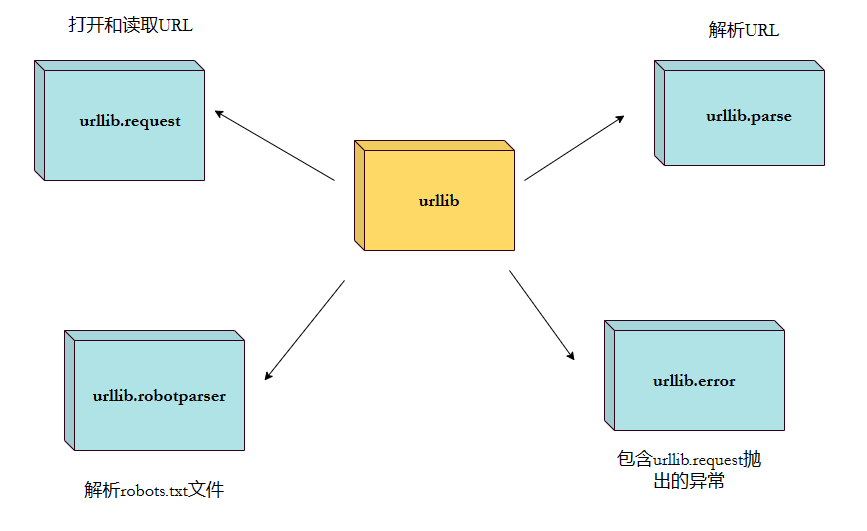
urllib 包 包含以下几个模块:
- urllib.request - 打开和读取 URL。
- urllib.error - 包含 urllib.request 抛出的异常。
- urllib.parse - 解析 URL。
- urllib.robotparser - 解析 robots.txt 文件。
urllib.request
urllib.request 定义了一些打开 URL 的函数和类,包含授权验证、重定向、浏览器 cookies等。
urllib.request 可以模拟浏览器的一个请求发起过程。
我们可以使用 urllib.request 的 urlopen 方法来打开一个 URL,语法格式如下:
urllib.request.urlopen(url, data=None, [timeout, ]*, cafile=None, capath=None, cadefault=False, context=None)
- url:url 地址。
- data:发送到服务器的其他数据对象,默认为 None。
- timeout:设置访问超时时间。
- cafile 和 capath:cafile 为 CA 证书, capath 为 CA 证书的路径,使用 HTTPS 需要用到。
- cadefault:已经被弃用。
- context:ssl.SSLContext类型,用来指定 SSL 设置。
实例如下:
from urllib.request import urlopen

myURL = urlopen("https://www.w3cschool.cn/")
print(myURL.read())
以上代码使用 urlopen 打开一个 URL,然后使用 read() 函数获取网页的 HTML 实体代码。
read() 是读取整个网页内容,我们可以指定读取的长度:
from urllib.request import urlopen

myURL = urlopen("https://www.w3cschool.cn/")
print(myURL.read(300))
除了 read() 函数外,还包含以下两个读取网页内容的函数:
- readline() - 读取文件的一行内容
from urllib.request import urlopen

myURL = urlopen("https://www.w3cschool.cn/")
print(myURL.readline()) #读取一行内容from urllib.request import urlopen
myURL = urlopen("https://www.w3cschool.cn/")
lines = myURL.readlines()
for line in lines:
print(line) 我们在对网页进行抓取时,经常需要判断网页是否可以正常访问,这里我们就可以使用 getcode() 函数获取网页状态码,返回 200 说明网页正常,返回 404 说明网页不存在:
import urllib.request

myURL1 = urllib.request.urlopen("https://www.w3cschool.cn/")
print(myURL1.getcode())   # 200

try:
    myURL2 = urllib.request.urlopen("https://www.w3cschool.cn/no.html")
except urllib.error.HTTPError as e:
    if e.code == 404:
print(404) # 404更多网页状态码可以查阅:https://www.w3cschool.cn/http/http-status-codes.html
如果要将抓取的网页保存到本地,可以使用 Python3 File write() 方法 函数:
from urllib.request import urlopen

myURL = urlopen("https://www.w3cschool.cn/")
f = open("w3cschool_urllib_test.html", "wb")
content = myURL.read()  # 读取网页内容
f.write(content)
f.close()
执行以上代码,在本地就会生成一个 w3cschool_urllib_test.html 文件,里面包含了 https://www.w3cschool.cn/ 网页的内容。
更多Python File 处理,可以参阅:https://www.w3cschool.cn/python3/python3-file-methods.html
URL 的编码与解码可以使用 urllib.request.quote() 与 urllib.request.unquote() 方法:
import urllib.request

encode_url = urllib.request.quote("https://www.w3cschool.cn/")  # 编码
print(encode_url)

unencode_url = urllib.request.unquote(encode_url)    # 解码
print(unencode_url)
输出结果为:
https%3A//www.w3cschool.cn/
https://www.w3cschool.cn/
模拟头部信息
我们抓取网页一般需要对 headers(网页头信息)进行模拟,这时候需要使用到 urllib.request.Request 类:
class urllib.request.Request(url, data=None, headers={}, origin_req_host=None, unverifiable=False, method=None)- url:url 地址。
- data:发送到服务器的其他数据对象,默认为 None。
- headers:HTTP 请求的头部信息,字典格式。
- origin_req_host:请求的主机地址,IP 或域名。
- unverifiable:很少用整个参数,用于设置网页是否需要验证,默认是False。。
- method:请求方法, 如 GET、POST、DELETE、PUT等。
import urllib.request
import urllib.parse

url = 'https://www.w3cschool.cn/search?w='  # 编程狮搜索页面
keyword = 'Python 教程'
key_code = urllib.request.quote(keyword)  # 对请求进行编码
url_all = url+key_code
header = {
    'User-Agent':'Mozilla/5.0 (X11; Fedora; Linux x86_64) AppleWebKit/537.36 (KHTML, like Gecko) Chrome/58.0.3029.110 Safari/537.36'
}   #头部信息
request = urllib.request.Request(url_all,headers=header)
reponse = urllib.request.urlopen(request).read()

fh = open("./urllib_test_w3cschool_search.html","wb")    # 将文件写入到当前目录中
fh.write(reponse)
fh.close()
执行以上 Python 代码,会在当前目录生成 urllib_test_w3cschool_search.html 文件,打开 urllib_test_w3cschool_search.html 文件(可以使用浏览器打开),内容如下:

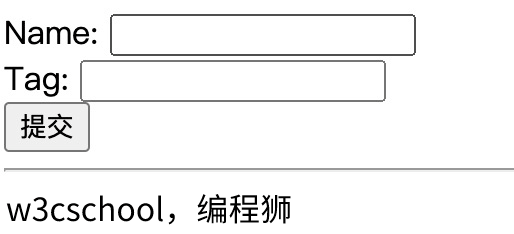
表单 POST 传递数据,我们先创建一个表单,代码如下,我这里使用了 PHP 代码来获取表单的数据:
<!DOCTYPE html>
<html>
<head>
<meta charset="utf-8">
<title>编程狮(w3cschool.cn) urllib POST  测试</title>
</head>
<body>
<form action="" method="post" name="myForm">
    Name: <input type="text" name="name"><br>
    Tag: <input type="text" name="tag"><br>
    <input type="submit" value="提交">
</form>
<hr>
<?php
// 使用 PHP 来获取表单提交的数据,你可以换成其他的
if(isset($_POST['name']) && $_POST['tag'] ) {
   echo $_POST["name"] . ', ' . $_POST['tag'];
}
?>
</body>
</html>
import urllib.request
import urllib.parse
url = 'https://www.w3cschool.cn/try/py3/py3_urllib_test.php' # 提交到表单页面
data = {'name':'w3cschool', 'tag' : '编程狮'} # 提交数据
header = {
'User-Agent':'Mozilla/5.0 (X11; Fedora; Linux x86_64) AppleWebKit/537.36 (KHTML, like Gecko) Chrome/58.0.3029.110 Safari/537.36'
} #头部信息
data = urllib.parse.urlencode(data).encode('utf8') # 对参数进行编码,解码使用 urllib.parse.urldecode
request=urllib.request.Request(url, data, header) # 请求处理
reponse=urllib.request.urlopen(request).read() # 读取结果
fh = open("./urllib_test_post_w3cschool.html","wb") # 将文件写入到当前目录中
fh.write(reponse)
fh.close()执行以上代码,会提交表单数据到 py3_urllib_test.php 文件,输出结果写入到 urllib_test_post_w3cschool.html 文件。
打开 urllib_test_post_w3cschool.html 文件(可以使用浏览器打开),显示结果如下:
urllib.error
urllib.error 模块为 urllib.request 所引发的异常定义了异常类,基础异常类是 URLError。
urllib.error 包含了两个方法,URLError 和 HTTPError。
URLError 是 OSError 的一个子类,用于处理程序在遇到问题时会引发此异常(或其派生的异常),包含的属性 reason 为引发异常的原因。
HTTPError 是 URLError 的一个子类,用于处理特殊 HTTP 错误例如作为认证请求的时候,包含的属性 code 为 HTTP 的状态码, reason 为引发异常的原因,headers 为导致 HTTPError 的特定 HTTP 请求的 HTTP 响应头。
对不存在的网页抓取并处理异常:
import urllib.request
import urllib.error

myURL1 = urllib.request.urlopen("https://www.w3cschool.cn/")
print(myURL1.getcode())   # 200

try:
    myURL2 = urllib.request.urlopen("https://www.w3cschool.cn/no.html")
except urllib.error.HTTPError as e:
    if e.code == 404:
        print(404)   # 404
urllib.parse
urllib.parse 用于解析 URL,格式如下:
urllib.parse.urlparse(urlstring, scheme='', allow_fragments=True)
urlstring 为 字符串的 url 地址,scheme 为协议类型,
allow_fragments 参数为 false,则无法识别片段标识符。相反,它们被解析为路径,参数或查询组件的一部分,并 fragment 在返回值中设置为空字符串。
from urllib.parse import urlparse

o = urlparse("https://www.w3cschool.cn/?s=python+%E6%95%99%E7%A8%8B")
print(o)
以上实例输出结果为:
ParseResult(scheme='https', netloc='www.w3cschool.cn', path='/', params='', query='s=python+%E6%95%99%E7%A8%8B', fragment='')
从结果可以看出,内容是一个元组,包含 6 个字符串:协议,位置,路径,参数,查询,判断。
我们可以直接读取协议内容:
from urllib.parse import urlparse

o = urlparse("https://www.w3cschool.cn/?s=python+%E6%95%99%E7%A8%8B")
print(o.scheme)
以上实例输出结果为:
https
完整内容如下:
|
属性 |
索引 |
值 |
值(如果不存在) |
|---|---|---|---|
|
|
0 |
URL协议 |
scheme 参数 |
|
|
1 |
网络位置部分 |
空字符串 |
|
|
2 |
分层路径 |
空字符串 |
|
|
3 |
最后路径元素的参数 |
空字符串 |
|
|
4 |
查询组件 |
空字符串 |
|
|
5 |
片段识别 |
空字符串 |
|
|
用户名 |
|
|
|
|
密码 |
|
|
|
|
主机名(小写) |
|
|
|
|
端口号为整数(如果存在) |
|
urllib.robotparser
urllib.robotparser 用于解析 robots.txt 文件。
robots.txt(统一小写)是一种存放于网站根目录下的 robots 协议,它通常用于告诉搜索引擎对网站的抓取规则。
urllib.robotparser 提供了 RobotFileParser 类,语法如下:
class urllib.robotparser.RobotFileParser(url='')
这个类提供了一些可以读取、解析 robots.txt 文件的方法:
- set_url(url) - 设置 robots.txt 文件的 URL。
- read() - 读取 robots.txt URL 并将其输入解析器。
- parse(lines) - 解析行参数。
- can_fetch(useragent, url) - 如果允许 useragent 按照被解析 robots.txt 文件中的规则来获取 url 则返回 True。
- mtime() -返回最近一次获取 robots.txt 文件的时间。 这适用于需要定期检查 robots.txt 文件更新情况的长时间运行的网页爬虫。
- modified() - 将最近一次获取 robots.txt 文件的时间设置为当前时间。
- crawl_delay(useragent) -为指定的 useragent 从 robots.txt 返回 Crawl-delay 形参。 如果此形参不存在或不适用于指定的 useragent 或者此形参的 robots.txt 条目存在语法错误,则返回 None。
- request_rate(useragent) -以 named tuple RequestRate(requests, seconds) 的形式从 robots.txt 返回 Request-rate 形参的内容。 如果此形参不存在或不适用于指定的 useragent 或者此形参的 robots.txt 条目存在语法错误,则返回 None。
- site_maps() - 以 list() 的形式从 robots.txt 返回 Sitemap 形参的内容。 如果此形参不存在或者此形参的 robots.txt 条目存在语法错误,则返回 None。
>>> import urllib.robotparser
>>> rp = urllib.robotparser.RobotFileParser()
>>> rp.set_url("http://www.musi-cal.com/robots.txt")
>>> rp.read()
>>> rrate = rp.request_rate("*")
>>> rrate.requests
3
>>> rrate.seconds
20
>>> rp.crawl_delay("*")
6
>>> rp.can_fetch("*", "http://www.musi-cal.com/cgi-bin/search?city=San+Francisco")
False
>>> rp.can_fetch("*", "http://www.musi-cal.com/")
True