
 TRAE-AI编程


JavaFX 效果
2018-03-13 00:28 更新
JavaFX教程 - JavaFX效果
混合效果
混合是将两个输入组合在一起的效果使用预定义的混合模式之一。
import javafx.application.Application;
import javafx.scene.Group;
import javafx.scene.Scene;
import javafx.scene.effect.BlendMode;
import javafx.scene.layout.HBox;
import javafx.scene.paint.Color;
import javafx.scene.shape.Circle;
import javafx.scene.shape.Rectangle;
import javafx.stage.Stage;

public class Main extends Application {
  public static void main(String[] args) throws Exception {
    launch(args);
  }

  @Override
  public void start(final Stage stage) throws Exception {

    Rectangle r = new Rectangle();
    r.setX(590);
    r.setY(50);
    r.setWidth(50);
    r.setHeight(50);
    r.setFill(Color.BLUE);

    Circle c = new Circle();
    c.setFill(Color.RED);
    c.setCenterX(590);
    c.setCenterY(50);
    c.setRadius(25);
    c.setBlendMode(BlendMode.SRC_ATOP);

    Group g = new Group();
    g.setBlendMode(BlendMode.SRC_OVER);
    g.getChildren().add(r);
    g.getChildren().add(c);

    HBox box = new HBox();
    box.getChildren().add(g);

    Scene scene = new Scene(box, 400, 450);
    stage.setScene(scene);
    stage.show();
  }
}
以下代码使用COLOR_BURN混合模式。
Text text1 = new Text(25, 25, "www.w3cschool.cn");
text1.setFill(Color.CHOCOLATE);
text1.setFont(Font.font(java.awt.Font.MONOSPACED, 35));

text1.setBlendMode(BlendMode.COLOR_BURN);
上面的代码生成以下结果。
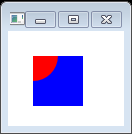
BlendMode.MULTIPLY
import javafx.application.Application;
import javafx.scene.Group;
import javafx.scene.Scene;
import javafx.scene.effect.BlendMode;
import javafx.scene.paint.Color;
import javafx.scene.shape.Circle;
import javafx.scene.shape.Rectangle;
import javafx.stage.Stage;

public class Main extends Application {
  public static void main(String[] args) {
    Application.launch(args);
  }

  @Override
  public void start(Stage primaryStage) {
    primaryStage.setTitle("Text Fonts");

    Group g = new Group();
    Scene scene = new Scene(g, 550, 250);

    Rectangle r = new Rectangle();
    r.setX(50);
    r.setY(50);
    r.setWidth(50);
    r.setHeight(50);
    r.setFill(Color.BLUE);

    Circle c = new Circle();
    c.setFill(Color.rgb(255, 0, 0, 0.5));
    c.setCenterX(50);
    c.setCenterY(50);
    c.setRadius(25);
    c.setBlendMode(BlendMode.MULTIPLY);

    g.getChildren().add(r);
    g.getChildren().add(c);

    primaryStage.setScene(scene);
    primaryStage.show();
  }
}
上面的代码生成以下结果。
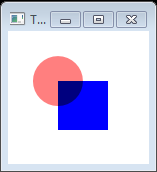
模糊效果高斯模糊
JavaFX支持boxblur,运动模糊或高斯模糊。文本与GaussianBlur。
高斯模糊使用具有可配置半径的高斯算法来模糊对象。
import javafx.application.Application;
import javafx.scene.Group;
import javafx.scene.Scene;
import javafx.scene.effect.GaussianBlur;
import javafx.scene.paint.Color;
import javafx.scene.text.Font;
import javafx.scene.text.FontWeight;
import javafx.scene.text.Text;
import javafx.stage.Stage;

public class Main extends Application {
  public static void main(String[] args) {
    Application.launch(args);
  }

  @Override
  public void start(Stage primaryStage) {
    primaryStage.setTitle("");
    Group root = new Group();
    Scene scene = new Scene(root, 300, 250, Color.WHITE);

    Group g = new Group();

    Text t = new Text();
    t.setX(10.0);
    t.setY(40.0);
    t.setCache(true);
    t.setText("Blurry Text");
    t.setFill(Color.RED);
    t.setFont(Font.font(null, FontWeight.BOLD, 36));

    t.setEffect(new GaussianBlur());

    g.getChildren().add(t);

    root.getChildren().add(g);
    primaryStage.setScene(scene);
    primaryStage.show();
  }
}
上面的代码生成以下结果。
BoxBlur效果
import javafx.application.Application;
import javafx.scene.Group;
import javafx.scene.Scene;
import javafx.scene.effect.BoxBlur;
import javafx.scene.paint.Color;
import javafx.scene.text.Font;
import javafx.scene.text.Text;
import javafx.stage.Stage;

public class Main extends Application {
    public static void main(String[] args) {
        Application.launch(args);
    }
    @Override
    public void start(Stage primaryStage) {
        primaryStage.setTitle("Text Fonts");
        Group root = new Group();
        Scene scene = new Scene(root, 550, 250,Color.web("0x0000FF",1.0));

        Text text = new Text(50, 100, "JavaFX 2.0 from Java2s.com");
        Font sanSerif = Font.font("Dialog", 30);
        text.setFont(sanSerif);
        text.setFill(Color.RED);
        root.getChildren().add(text);

        BoxBlur bb = new BoxBlur();
        bb.setWidth(15);
        bb.setHeight(15);
        bb.setIterations(3);

        text.setEffect(bb);
        primaryStage.setScene(scene);
        primaryStage.show();
    }
}
上面的代码生成以下结果。
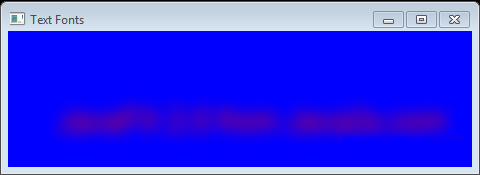
运动模糊
使用运动模糊,我们可以配置半径和角度来创建移动对象的效果。
import javafx.application.Application;
import javafx.scene.Scene;
import javafx.scene.effect.MotionBlur;
import javafx.scene.layout.HBox;
import javafx.scene.paint.Color;
import javafx.scene.text.Font;
import javafx.scene.text.FontWeight;
import javafx.scene.text.Text;
import javafx.stage.Stage;

public class Main extends Application {
  public static void main(String[] args) throws Exception {
    launch(args);
  }
  @Override
  public void start(final Stage stage) throws Exception {

    Text t = new Text();
    t.setX(20.0f);
    t.setY(80.0f);
    t.setText("Motion Blur");
    t.setFill(Color.RED);
    t.setFont(Font.font("Arial", FontWeight.BOLD, 60));

    MotionBlur mb = new MotionBlur();
    mb.setRadius(15.0f);
    mb.setAngle(45.0f);

    t.setEffect(mb);

    t.setTranslateX(10);
    t.setTranslateY(150);

    HBox box = new HBox();
    box.getChildren().add(t);

    Scene scene = new Scene(box, 400, 450);
    stage.setScene(scene);
    stage.show();
  }
}
上面的代码生成以下结果。
绽放效果
基于可配置的阈值,bloom效果使得较亮的部分看起来发光。
阈值在0.0到1.0之间。默认情况下,阈值设置为0.3。
import javafx.application.Application;
import javafx.scene.Group;
import javafx.scene.Scene;
import javafx.scene.effect.Bloom;
import javafx.scene.paint.Color;
import javafx.scene.shape.Rectangle;
import javafx.scene.text.Font;
import javafx.scene.text.FontWeight;
import javafx.scene.text.Text;
import javafx.stage.Stage;

public class Main extends Application {
    public static void main(String[] args) {
        Application.launch(args);
    }
    @Override
    public void start(Stage primaryStage) {
        primaryStage.setTitle("Text Fonts");

        Group g = new Group();
        Scene scene = new Scene(g, 550, 250,Color.web("0x0000FF",1.0));

        Rectangle r = new Rectangle();
        r.setX(10);
        r.setY(10);
        r.setWidth(160);
        r.setHeight(80);
        r.setFill(Color.DARKBLUE);

        Text t = new Text();
        t.setText("Bloom!");
        t.setFill(Color.YELLOW);
        t.setFont(Font.font(null, FontWeight.BOLD, 36));
        t.setX(25);
        t.setY(65);

        g.setCache(true);
        g.setEffect(new Bloom());
        g.getChildren().add(r);
        g.getChildren().add(t);


        primaryStage.setScene(scene);
        primaryStage.show();
    }
}
上面的代码生成以下结果。
下降阴影效果
阴影效果呈现内容的阴影。我们可以配置阴影的颜色,半径,偏移和其他参数。
import javafx.application.Application;
import javafx.scene.Group;
import javafx.scene.Scene;
import javafx.scene.effect.DropShadow;
import javafx.scene.paint.Color;
import javafx.scene.text.Font;
import javafx.scene.text.Text;
import javafx.stage.Stage;

public class Main extends Application {
    public static void main(String[] args) {
        Application.launch(args);
    }
    @Override
    public void start(Stage primaryStage) {
        primaryStage.setTitle("Text Fonts");
        Group root = new Group();
        Scene scene = new Scene(root, 550, 250, Color.WHITE);

        Text text = new Text(150, 50, "JavaFX from Java2s.com");
        text.setFill(Color.BLUE);
        DropShadow dropShadow = new DropShadow();
        dropShadow.setOffsetX(2.0f);
        dropShadow.setOffsetY(4.0f);
        dropShadow.setColor(Color.rgb(150, 50, 50, .688));
        text.setEffect(dropShadow);

        root.getChildren().add(text);

        primaryStage.setScene(scene);
        primaryStage.show();
    }
}
上面的代码生成以下结果。
内部阴影效果
内部阴影效果在具有指定颜色,半径和偏移的内容内绘制阴影。
import javafx.application.Application;
import javafx.scene.Scene;
import javafx.scene.effect.InnerShadow;
import javafx.scene.layout.HBox;
import javafx.scene.paint.Color;
import javafx.scene.text.Font;
import javafx.scene.text.FontWeight;
import javafx.scene.text.Text;
import javafx.stage.Stage;

public class Main extends Application {
  public static void main(String[] args) throws Exception {
    launch(args);
  }
  @Override
  public void start(final Stage stage) throws Exception {
    Text t = new Text();
    t.setX(20.0f);
    t.setY(80.0f);
    t.setText("www.w3cschool.cn");
    t.setFill(Color.RED);
    t.setFont(Font.font("Arial", FontWeight.BOLD, 60));

    InnerShadow is = new InnerShadow();
    is.setOffsetX(2.0f);
    is.setOffsetY(2.0f);

    t.setEffect(is);

    t.setTranslateX(10);
    t.setTranslateY(150);

    HBox box = new HBox();
    box.getChildren().add(t);

    Scene scene = new Scene(box, 400, 450);
    stage.setScene(scene);
    stage.show();
  }
}
上面的代码生成以下结果。
反射
反射效果将对象的反射版本渲染到实际对象下面。
import javafx.application.Application;
import javafx.scene.Group;
import javafx.scene.Scene;
import javafx.scene.effect.Reflection;
import javafx.scene.paint.Color;
import javafx.scene.text.Font;
import javafx.scene.text.Text;
import javafx.stage.Stage;

public class Main extends Application {
    public static void main(String[] args) {
        Application.launch(args);
    }
    @Override
    public void start(Stage primaryStage) {
        primaryStage.setTitle("Text Fonts");
        Group root = new Group();
        Scene scene = new Scene(root, 550, 250, Color.WHITE);

        Text text = new Text(50, 50, "JavaFX 2.0 from Java2s.com");
        Font monoFont = Font.font("Dialog", 30);
        text.setFont(monoFont);
        text.setFill(Color.BLACK);
        root.getChildren().add(text);

        Reflection refl = new Reflection();
        refl.setFraction(0.8f);
        text.setEffect(refl);

        primaryStage.setScene(scene);
        primaryStage.show();
    }
}
上面的代码生成以下结果。
照明效果
照明效果产生照射给定内容的光源。它可以给平面物体更逼真的三维外观。
import javafx.application.Application;
import javafx.scene.Group;
import javafx.scene.Scene;
import javafx.scene.effect.Effect;
import javafx.scene.effect.Glow;
import javafx.scene.effect.Light;
import javafx.scene.effect.Lighting;
import javafx.scene.paint.Color;
import javafx.scene.text.Font;
import javafx.scene.text.Text;
import javafx.stage.Stage;

public class Main extends Application
{
   @Override
   public void start(final Stage stage) throws Exception
   {
      Group rootGroup = new Group();
      Scene scene =new Scene(rootGroup, 800, 400);

      Text text1 = new Text(25, 25, "www.w3cschool.cn");
      text1.setFill(Color.CHOCOLATE);
      text1.setFont(Font.font(java.awt.Font.MONOSPACED, 35));

      final Light.Distant light = new Light.Distant();
      light.setAzimuth(-135.0);
      final Lighting lighting = new Lighting();
      lighting.setLight(light);
      lighting.setSurfaceScale(9.0);
      text1.setEffect(lighting);


      rootGroup.getChildren().add(text1);

      stage.setScene(scene);
      stage.show();
   }
   public static void main(final String[] arguments)
   {
      Application.launch(arguments);
   }
}
上面的代码生成以下结果。
发光的文本
import javafx.application.Application;
import javafx.scene.Group;
import javafx.scene.Scene;
import javafx.scene.effect.Effect;
import javafx.scene.effect.Glow;
import javafx.scene.paint.Color;
import javafx.scene.text.Font;
import javafx.scene.text.Text;
import javafx.stage.Stage;

public class Main extends Application
{
   @Override
   public void start(final Stage stage) throws Exception
   {
      Group rootGroup = new Group();
      Scene scene =new Scene(rootGroup, 800, 400);

      Text text1 = new Text(25, 25, "www.w3cschool.cn");
      text1.setFill(Color.CHOCOLATE);
      text1.setFont(Font.font(java.awt.Font.MONOSPACED, 35));

      Effect glow = new Glow(1.0);
      text1.setEffect(glow);

      rootGroup.getChildren().add(text1);

      stage.setScene(scene);
      stage.show();
   }
   public static void main(final String[] arguments)
   {
      Application.launch(arguments);
   }
}
上面的代码生成以下结果。
透视效果
透视效果从二维对象产生三维效果。
import javafx.application.Application;
import javafx.scene.Group;
import javafx.scene.Scene;
import javafx.scene.effect.PerspectiveTransform;
import javafx.scene.paint.Color;
import javafx.scene.shape.Rectangle;
import javafx.scene.text.Font;
import javafx.scene.text.FontWeight;
import javafx.scene.text.Text;
import javafx.stage.Stage;

public class Main extends Application {

  @Override
  public void start(Stage stage) {
    Group root = new Group();
    Scene scene = new Scene(root, 260, 80);
    stage.setScene(scene);


    Group g = new Group();
    PerspectiveTransform pt = new PerspectiveTransform();
    pt.setUlx(10.0);
    pt.setUly(10.0);
    pt.setUrx(310.0);
    pt.setUry(40.0);
    pt.setLrx(310.0);
    pt.setLry(60.0);
    pt.setLlx(10.0);
    pt.setLly(90.0);

    g.setEffect(pt);
    g.setCache(true);

    Rectangle r = new Rectangle();
    r.setX(10.0);
    r.setY(10.0);
    r.setWidth(280.0);
    r.setHeight(80.0);
    r.setFill(Color.BLUE);

    Text t = new Text();
    t.setX(20.0);
    t.setY(65.0);
    t.setText("JavaFX");
    t.setFill(Color.YELLOW);
    t.setFont(Font.font(null, FontWeight.BOLD, 36));

    g.getChildren().add(r);
    g.getChildren().add(t);

    scene.setRoot(g);
    stage.show();
  }

  public static void main(String[] args) {
    launch(args);
  }
}
上面的代码生成以下结果。
创建效果链
import javafx.application.Application;
import javafx.scene.Scene;
import javafx.scene.effect.DropShadow;
import javafx.scene.effect.Reflection;
import javafx.scene.layout.HBox;
import javafx.scene.paint.Color;
import javafx.scene.text.Font;
import javafx.scene.text.FontWeight;
import javafx.scene.text.Text;
import javafx.stage.Stage;

public class Main extends Application {
  public static void main(String[] args) throws Exception {
    launch(args);
  }
  @Override
  public void start(final Stage stage) throws Exception {
    Text t = new Text();
    t.setX(20.0f);
    t.setY(80.0f);
    t.setText("www.w3cschool.cn");
    t.setFill(Color.RED);
    t.setFont(Font.font("Arial", FontWeight.BOLD, 60));

    DropShadow ds = new DropShadow();
    ds.setOffsetY(5.0);
    ds.setOffsetX(5.0);
    ds.setColor(Color.GRAY);

    Reflection reflection = new Reflection();

    ds.setInput(reflection);

    t.setEffect(ds);

    t.setTranslateX(10);
    t.setTranslateY(150);

    HBox box = new HBox();
    box.getChildren().add(t);

    Scene scene = new Scene(box, 400, 450);
    stage.setScene(scene);
    stage.show();
  }
}
上面的代码生成以下结果。
以上内容是否对您有帮助:
















更多建议: